Laser distance, VL53L1X
Laser time of flight to 4 m over I2C at 0x29, sixteen-bit register addresses.
- 6 pins
- 1 setting
- In 1 project
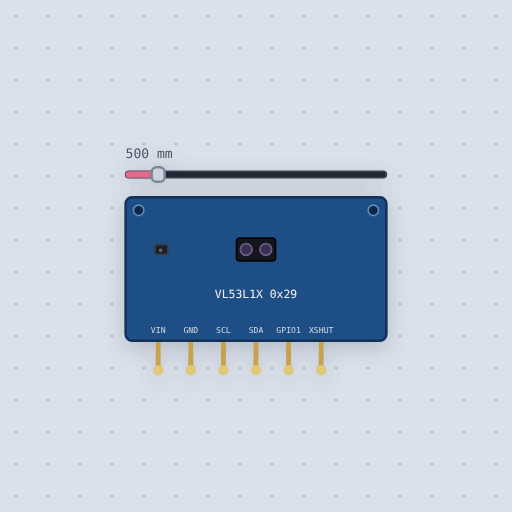
The Laser distance, VL53L1X in brief
What it is, and every setting the properties panel gives it.
The VL53L1X is ST’s laser time-of-flight distance sensor: it fires a pulse of infrared light, times the reflection and reports millimeters, up to 4 m. It is the long-range relative of the VL53L0X, with the same tiny two-lens module and about three times the reach, and three distance modes that trade range for resistance to bright ambient light. It talks I2C at 0x29 with sixteen-bit register addresses, and an XSHUT pin, pulled up on the board, switches it off when held low. In Mokxi a slider places the target from 0 to 4000 mm. The model boots for 1.2 ms before it answers, ranges continuously or once, flags each result on its interrupt, reports a good range or no target, and caps each distance mode at its reach: 1.3 m short, 3 m medium, 4 m long. The timing budget, the region of interest and the target’s color do not change the result here.
- Family
- Sensors
- Pins
- 6
- distance
- 500
6 pins
Named as the editor names them, so a wire lands where you expect it.
How to use the VL53L1X distance sensor with an Arduino
VIN to 5 V, GND to ground, SDA and SCL to the Uno’s I2C pins. The height meter project puts a DPS310 barometer on the same bus: the laser gives the height above the floor to a few millimeters, the barometer the height climbed, the two halves of a drone’s altimeter.
With Pololu’s VL53L1X library, call setTimeout() so a missing sensor cannot hang the sketch, init() to boot it, setDistanceMode(VL53L1X::Long) for the full 4 m, a timing budget in microseconds and startContinuous() with the period between readings in milliseconds. Each read() returns millimeters; check ranging_data.range_status for VL53L1X::RangeValid before trusting it. Drag the distance slider and the floor reading follows; push it past the mode’s reach and the sketch prints out of range.
The sensor runs from 2.6 to 5.5 V, so it wires straight to an ESP32 or a Pico at 3.3 V. Adafruit’s and SparkFun’s VL53L1X libraries compile here too if your code uses theirs.
#include <Wire.h>
#include <VL53L1X.h>

VL53L1X ranger;

void setup() {
  Wire.begin();
  ranger.setTimeout(500);
  ranger.init();
  ranger.setDistanceMode(VL53L1X::Long);
  ranger.setMeasurementTimingBudget(50000);
  ranger.startContinuous(100);
}

void loop() {
  uint16_t mm = ranger.read();
  if (ranger.ranging_data.range_status == VL53L1X::RangeValid) {
    // mm is a good distance
  }
}
Common Laser distance, VL53L1X errors and fixes
Questions and answers
How far can the VL53L1X measure?
Up to 4 m in long mode, 3 m in medium and 1.3 m in short mode, which copes better with bright surroundings.
What is the difference between the VL53L1X and the VL53L0X?
The VL53L1X reaches about three times as far and has selectable distance modes; the two share the module shape and the 0x29 address. The VL53L0X has its own page here.
What does the XSHUT pin do?
Held low it switches the sensor off. It is how several sensors are brought up one at a time to give each a different address.
Does the color of the target matter?
On a real sensor a dark target returns less light and shortens the range. The simulation does not model the target’s color, so test with real surfaces before relying on the far end of a mode.
What is true about the Laser distance, VL53L1X, here
In its help article’s own words: what the simulation gets right, and where it stops.
Not modeled
The timing budget's effect on the measurement time, the region of interest, the calibrations, noise, and the target's color.
From VL53L1X laser distance sensor, in full.
See the Laser distance, VL53L1X in a project
One built-in project uses it. It opens in the editor, already wired.
The boards it is shown on
This board has a built-in project with the Laser distance, VL53L1X in it.
Arduino libraries for the Laser distance, VL53L1X
Built in, so the sketch compiles with nothing to install. Each page has the calls, the wiring and an example to run.
The rest of the bench
Every one of these is drawn and simulated the same way.
Wire up the Laser distance, VL53L1X
Open the editor and push it into the breadboard. It is free, and it runs on your own machine.