Compass, QMC5883L (GY-271)
The GY-271 compass most sellers ship now: the Earth’s field on three axes over I2C at 0x0D, turned by a heading slider, for QMC5883LCompass.h.
- 5 pins
- 3 settings
- In 1 project
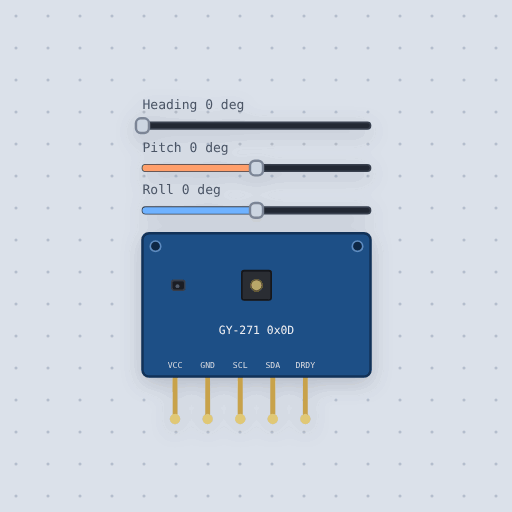
The Compass, QMC5883L (GY-271) in brief
What it is, and every setting the properties panel gives it.
The QMC5883L is a three-axis magnetometer made by QST. It sits on most GY-271 compass boards sold today and talks over I2C at address 0x0D. Flat on a bench it reads the Earth's field, and atan2 of the two horizontal readings gives the heading, which is what a compass sketch does. Boards sold as GY-271 once carried the Honeywell HMC5883L, which has a different address and register map, so a sketch written for the other chip finds nothing. Mokxi models the chip's registers, including control register 1, the status register and the six data bytes read in one block. It does not model noise, offsets, nearby magnets or the temperature offset. The sliders set heading, pitch and roll, so you can turn and tip the board while a sketch runs.
- Family
- Sensors
- Pins
- 5
- pitch
- 0
- roll
- 0
- heading
- 0
5 pins
Named as the editor names them, so a wire lands where you expect it.
How to use the QMC5883L compass (GY-271) with an Arduino
The example project wires a QMC5883L compass on a GY-271 board to an Arduino Uno. The board measures the magnetic field along X, Y and Z. The sketch prints the azimuth in degrees and the compass point four times a second.
With the default settings, the serial monitor shows: "GY-271 compass at 0x0D", then "azimuth 0 N", then "azimuth 60 NE". The heading slider starts at 0, so the first reading is north.
Change the heading setting to 180 and run again. The serial monitor shows: "GY-271 compass at 0x0D", then "azimuth 0 N", then "azimuth 180 S". The board now faces south, so the azimuth follows it.
Try the pitch slider too. Tipping the board makes the heading drift, because the flat readings pick up part of the field's downward pull. That is why phones use an accelerometer to correct their compass.
// A GY-271 compass (QMC5883L) on the Uno's I2C bus.
//
// The QMC5883L measures the magnetic field along X, Y and Z. Flat on a desk,
// the Earth's field points north (and down), so the angle of the two flat
// readings, atan2(y, x), is the way the board's X arrow faces: its azimuth.
//
//   GY-271  VCC -> 5V, GND -> GND, SCL -> SCL (A5), SDA -> SDA (A4)
//
// Four times a second the sketch prints the azimuth in degrees and the
// compass point it falls in. Drag the heading slider while it runs.
//
// THINGS TO TRY. Tip the board with the pitch slider: the heading drifts,
// because the flat readings now carry part of the field's downward pull.
// That is why phones use an accelerometer to correct their compass.

#include <Wire.h>
#include <QMC5883LCompass.h>

QMC5883LCompass compass;

void setup() {
  Serial.begin(9600);
  compass.init();
  Serial.println("GY-271 compass at 0x0D");
}

void loop() {
  compass.read();
  int azimuth = compass.getAzimuth();
  char dir[3];
  compass.getDirection(dir, azimuth);

  Serial.print("azimuth ");
  Serial.print(azimuth);
  Serial.print("  ");
  for (int i = 0; i < 3; i++) {
    if (dir[i] != ' ') Serial.print(dir[i]);
  }
  Serial.println();
  delay(250);
}
Common Compass, QMC5883L (GY-271) errors and fixes
Questions and answers
What is a GY-271 compass module?
It is a small board with a QMC5883L three-axis magnetometer. It measures the magnetic field and lets a sketch work out its heading.
How do I connect the QMC5883L to an Arduino?
Wire VCC to 5 V, GND to GND, SCL to SCL and SDA to SDA. The board has its own regulator and I2C pull-ups.
What does getAzimuth() return?
It returns an angle from -180 to 180 degrees. It is 0 when the board's X arrow points north.
Can I change where the compass points in the simulator?
Yes. Drag the heading, pitch and roll sliders while the sketch runs. Pitch and roll tip the board, which makes the heading drift.
What is true about the Compass, QMC5883L (GY-271), here
In its help article’s own words: what the simulation gets right, and where it stops.
Not modeled
Noise, offsets, the oversampling filter and the SET/RESET period's effect (both are
stored and read back), nearby magnets and the hard iron of a robot chassis. The
temperature registers' offset is not calibrated on the real chip, only their 100 counts a
degree, so the model reads 0 and holds still.
From QMC5883L compass (GY-271), in full.
See the Compass, QMC5883L (GY-271) in a project
One built-in project uses it. It opens in the editor, already wired.
The boards it is shown on
This board has a built-in project with the Compass, QMC5883L (GY-271) in it.
The rest of the bench
Every one of these is drawn and simulated the same way.
Wire up the Compass, QMC5883L (GY-271)
Open the editor and push it into the breadboard. It is free, and it runs on your own machine.