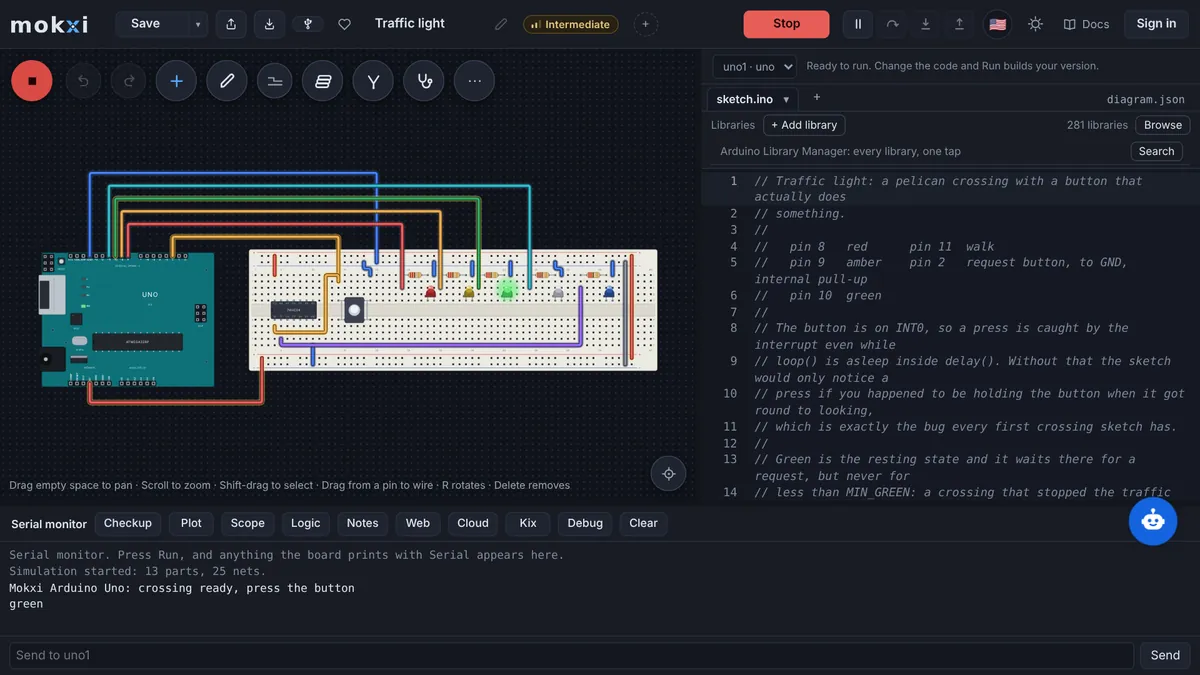
Arduino simulation for Atal Tinkering Labs and CBSE classes
Every student simulates the ATL kit’s Arduino Uno, Nano and Mega in the browser, boards or no boards. Prices in rupees.
The ATL equipment list names the Arduino Uno, Nano and Mega, the ATL Tinkering Curriculum has two chapters on Arduino basics, and NEP 2020 brings coding into the Middle Stage. Here is how a lab with forty-five Unos and ninety students, or a class with none, runs on a simulator, priced in rupees.
Written for ATL in-charges, CBSE skill subject coordinators and the computer teacher who has been handed the tinkering period. The facts about Atal Tinkering Labs below come from aim.gov.in, the CBSE facts from the Board’s own circular, and the policy wording from the published National Education Policy; all are linked under Sources. Mokxi is not on any government equipment list and has no tie to NITI Aayog or CBSE; this page explains where a free browser simulator fits beside the hardware those bodies describe.
Atal Tinkering Labs: the Arduino is already in the equipment list
aim.gov.in states that “Atal Innovation Mission is establishing Atal Tinkering Laboratories (ATLs) in schools across India”, lists 10,000 operational ATLs, and names the skills the labs are for: “design mindset, computational thinking, adaptive learning, physical computing etc.” The ATL Tinkering Curriculum Level II document carries the Mission Director’s line that “over 75 lakh students in India get to learn in these ATLs”.
The official ATL Equipment List for a batch of 90 students says “All ATL Schools are required to purchase equipment, as per the ‘ATL Equipment list’” and is split into four packages, the first of them “P1 - Electronics Development, Robotics, Internet of Things, and Sensors”. The very first line of Package 1 is “Arduino Uno or equivalent”, specified as an “ATmega328P - 8 bit AVR family microcontroller, equivalent or better” with a suggested quantity of 45, marked consumable, followed by lines for the “Arduino Nano” and the “Arduino Mega”. Mokxi simulates all three: the Uno, the Nano and the Mega 2560, running the same sketch a student would upload to the physical board.
The same site lists the ATL Tinkering Curriculum, an “Arduino Module” and a “Physical Computing (IoT) Module” among the teaching material, and Level II of the curriculum has the chapters “Basics of Arduino-1” and “Basics of Arduino -2”. A simulator slots into those two chapters directly: the reading stays the same, and the exercise at the end of each one is done on a screen before it is done on a board.
Ninety students, forty-five Unos
Forty-five consumable Unos for a batch of ninety is two students to a board, and a board that is being wired is a board nobody else is using. The arrangement that works is to let every student simulate and share the hardware for the build. In the simulator, each student has their own Uno, their own breadboard and their own copy of the circuit; mistakes cost nothing, a shorted LED is a message rather than a dead part, and the sketch is already debugged when a pair sits down at the real board.
A class with no boards at all, a school still waiting on its lab, or a tinkering period in a computer room can do the whole Arduino programming pack this way, and the beginner projects open in one click with no sign-in. For the electronics before the microcontroller, resistors, LEDs, series and parallel, the intro to electronics pack is the same material a Level I ATL session covers.
CBSE skill subjects 402 and 417
CBSE’s list of skill courses at secondary level (classes IX and X) includes “402 Information Technology” and “417 Artificial Intelligence”, each with 50 marks of theory and 50 of practical, and the circular states that “NO FEE is to be paid by the school to the Board for starting Skill courses at Secondary level”. Neither is an electronics subject, and we do not claim to teach either syllabus. We name them because schools that offer them are the schools that ask us about a tinkering period, and because the practical half of both benefits from a physical computing project: a sensor circuit that produces real readings is a better data set for an AI class than a spreadsheet of made-up numbers.
NEP 2020: coding from the Middle Stage
Paragraph 4.25 of the National Education Policy 2020 says that “mathematics and computational thinking will be given increased emphasis throughout the school years” and ends with “Activities involving coding will be introduced in Middle Stage”, which is Grades 6 to 8. Paragraph 4.26 adds that every student will take “a fun course, during Grades 6-8, that gives a survey and hands-on experience of a sampling of important vocational crafts, such as carpentry, electric work, metal work, gardening, pottery making, etc.” A blinking LED that a Grade 6 student wired and programmed is both of those at once.
What a class does in Mokxi
- Every student has a simulated Uno, Nano or Mega, a breadboard and the common sensors and outputs in the browser on the free plan, with nothing to install on the lab computers.
- The compiler runs in the browser; the first build downloads it once (about 70 MB) and keeps it, so a lab on a modest connection pays that cost one time per machine rather than on every sketch.
- The ATL in-charge makes a class, students join with a six-character code, and the starter circuit for the day reaches every screen at once; the teacher guide shows the steps.
- The same sketch uploads to the physical Uno from Chrome over USB when a pair’s turn at the board comes, and the Chromebook digital electronics guide covers the logic side for schools whose lab machines are Chromebooks.
Prices in rupees, with the regional price
The free plan costs nothing and does not expire. India has a regional price that takes 75% off Pro and the student price: Pro is about ₹192 a month or about ₹1,440 a year, and a verified student pays about ₹192 a month (the student month is priced the same as Pro’s month, the least a month can cost) or about ₹720 a year; see the student discount. Classroom seats are ₹240 a student a year from 5 students; the teacher’s seat is free, and one class can be tried free for 30 days with no card.
Estimated in INR. Stripe confirms the exact local amount before payment.
Checkout reads the country from the connection, so a school in India sees these prices on the pricing page without choosing anything.
What the principal and the lab in-charge will ask
- Nothing to install and nothing to maintain: Mokxi runs in Chrome or Edge on the lab PCs or on Chromebooks. The IT setup page lists the few domains a school filter must allow, and the readiness test checks a machine on the school network.
- What is stored about a student, who processes it and how a school has it deleted are on the student data privacy page; no analytics or advertising tag loads for a student in a class.
- Assignments can carry automatic checks that run each submission on the simulation engine, so forty-five pairs of hands get feedback the same period; the classroom documentation explains checks and rosters.
- A school or trust can pay Classroom by card or on an invoice, and a written quote is available from the classroom page.
The US version of this page
For comparison with the US framework pages, see the NGSS, CSTA and ISTE standards map, how US schools pay for a lab and the engineering units mapped to NGSS and CSTA.
Sources
Questions from ATL in-charges and CBSE coordinators
Prices in INR, as a visitor from India sees them on the pricing page.
Is Mokxi part of the ATL equipment list?
No. The ATL Equipment List names hardware: the Arduino Uno or equivalent, the Nano, the Mega, sensors and tools. Mokxi is a free browser simulator of those same boards, used so that every student can practice before a shared board is free.
Does the simulator match the Arduino Uno, Nano and Mega that the list names?
Yes. All three boards are simulated, with their pins and the same compiled sketch a student would upload to the real one. The ATmega328P on the Uno and Nano and the Mega 2560 behave as the physical chips do for the projects in the ATL curriculum.
Our lab connection is slow. Will it work?
The simulator runs on the lab computer itself. The compiler is downloaded once, about 70 MB, and kept by the browser, so after the first build on each machine a sketch compiles without waiting on the connection.
What does Pro cost in India?
India has a regional price of 75% off. Pro is about ₹192 a month or about ₹1,440 a year, the student price is about ₹192 a month or about ₹720 a year, and Classroom is ₹240 a student a year from 5 students. The free plan stays free.
Does it teach CBSE skill subject 402 or 417?
No. Information Technology (402) and Artificial Intelligence (417) are not electronics subjects, and Mokxi does not cover their syllabi. It fits beside them as the hands-on physical computing in a tinkering period, or as the source of real sensor data for a practical.