Touch keypad, TTP229 16-key
Sixteen touch pads on two wires: clock SCL and each pulse puts the next key on SDO, low while touched. Link TP2 for 16 keys.
- 12 pins
- 3 settings
- In 1 project
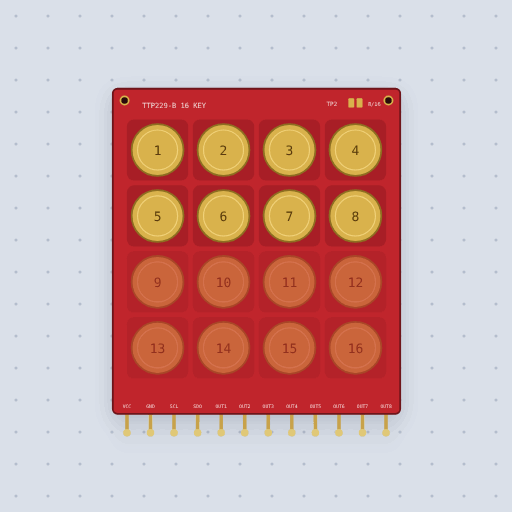
The Touch keypad, TTP229 16-key in brief
What it is, and every setting the properties panel gives it.
The TTP229-B is a red 16-key capacitive touch keypad. Each printed pad is one plate of a capacitor and a finger is the other; the Tontek TTP229-BSF chip on the back watches all sixteen pads and reports them over its own two-wire serial interface, SCL and SDO, which is not I2C and not SPI. In 8-key mode it also drives eight direct outputs, OUT1 to OUT8, high while touched. The model gets the serial frame right: each clock pulse on SCL puts the next key on SDO, key 1 first, 16 bits or 8, with SCL from 1 kHz to 512 kHz. It also models data valid, the 93 µs SDO pulse once a scan while a key is touched, and the scan timing, 32 ms with 16 keys and 16 ms with 8. It leaves out sensitivity adjustment, the 4 s recalibration while no key is touched, sleep mode's slower wake-up sampling, the maximum key-on time, open-drain direct outputs, and the sheet's mixed single and multi-key group modes.
- Family
- Inputs
- Pins
- 12
- keys
- 8 (or 16)
- activehigh
- false
- multikey
- false
12 pins
Named as the editor names them, so a wire lands where you expect it.
How to use the TTP229 touch keypad with an Arduino Uno
The example project is Touch keys. A red TTP229-B 16-key touch keypad is wired to an Arduino Uno with two signal wires: SCL to pin 2 and SDO to pin 3. VCC goes to the Uno's 5 V pin and GND to GND, both through the breadboard power rail. The TP2 pads are linked so the chip runs in 16-key mode. Touch a pad and its number prints on the serial monitor.
The sketch includes TTP229.h and makes a TTP229 object on pins 2 and 3. ReadKey16() waits for a touch and returns the key, 1 to 16. A held key is reported once a scan, every 32 ms, so a sketch that prints whatever it returns would print the same key about 30 times a second. This sketch prints a key only when it changes, or when the same key comes back after a gap of more than 100 ms, which is a new touch.
With default settings, the serial monitor printed: "TTP229 touch keys: touch a key". That is the startup line from setup(), printed once. No key was touched yet, so no key number follows.
After a touch on key 1, the serial monitor printed: "Key 1". That is the number of the pad touched, 1 to 16. Things to try: hold a key down and watch it print once, not 30 times a second; touch several pads at once and see which one wins; set keys to 8 and the sketch must call ReadKey8() instead, since pads 9 to 16 stop being keys.
// Touch keys: the red TTP229-B keypad prints the key you touch.
//
//   pin 2  the keypad's SCL      pin 3  its SDO
//   VCC -> 5 V, GND -> GND       the TP2 pads linked: 16 keys
//
// Sixteen pads and only two wires. The TTP229 is not I2C and not SPI: while
// a key is touched it pulses SDO low for 93 us once a scan (that is "data
// valid"), and then each clock pulse on SCL, low then high, puts the next
// key on SDO, key 1 first, low if it is touched. Sixteen pulses read the
// whole pad. TTP229.h does all of that.
//
// As shipped the board is in 8-key mode and sends only 8 bits. Linking the
// TP2 pads (the part's `keys` setting, 16 here) makes it 16; with them open,
// call ReadKey8() instead.
//
// ReadKey16() waits for a touch, and while a key is held the chip reports
// it once a scan, every 32 ms. So a key held down comes back again and
// again; the sketch prints it once, and again only after a gap (a new
// touch) or when the key changes.

#include <TTP229.h>

const int SCL_PIN = 2;
const int SDO_PIN = 3;

TTP229 ttp229(SCL_PIN, SDO_PIN);

uint8_t last = 0;
unsigned long lastSeen = 0;

void setup() {
  Serial.begin(9600);
  Serial.println("TTP229 touch keys: touch a key");
}

void loop() {
  uint8_t key = ttp229.ReadKey16();  // waits for a touch
  unsigned long now = millis();
  if (key && (key != last || now - lastSeen > 100)) {
    Serial.print("Key ");
    Serial.println(key);
  }
  last = key;
  lastSeen = now;
}
Common Touch keypad, TTP229 16-key errors and fixes
Questions and answers
is the ttp229 keypad i2c
No. It uses its own two-wire serial interface on SCL and SDO, which is not I2C and not SPI.
how do i get 16 keys on the ttp229
Link the TP2 pads, which is the keys setting set to 16. In 8-key mode pads 9 to 16 are direct outputs and the serial frame is 8 bits.
what do readkey16 and getkey16 return
ReadKey16() waits for a touch and returns the key, 1 to 16. GetKey16() waits up to about 50 ms and returns the last key if none came. Key numbers are 0 for none, and with several keys the highest wins.
what voltage does the ttp229 need
VCC takes 2.4 V to 5.5 V. The example wires it to the Uno's 5 V pin.
What is true about the Touch keypad, TTP229 16-key, here
In its help article’s own words: what the simulation gets right, and where it stops.
Modeled
The serial frame, from the datasheet. Each clock pulse on SCL puts the next key
on SDO, key 1 first, 16 bits or 8. With TP1 open a pulse starts on the falling
edge, so the library's "SCL low, read SDO, SCL high" reads one key per pulse. If
SCL sits still for 2 ms (Tout) the interface resets and the next pulse is key 1
again. The sheet allows 1 kHz to 512 kHz on SCL.
Data valid. While a key is touched, SDO pulses low for 93 µs once a scan (DV),
and the first clock may come 10 µs after it ends. A library that waits for a touch
waits for this pulse. The sheet does not say whether DV comes with no key touched;
here it does not, which is how the library's blocking read behaves on a real board.
Timing. A touch or a release shows at the next scan: 32 ms with 16 keys, 16 ms with 8, the sheet's response time. For about half a second after power the keys are off while the chip calibrates. A finger still on a pad when that ends was measured as part of the pad, and counts only once it lifts and comes back.
Not modeled
Sensitivity (a pad either feels a finger or it does not), the 4 s recalibration
while no key is touched, the sleep mode's slower wake-up sampling (TP5, TP6), the
maximum key-on time (TP7, about 80 s, off as shipped), open-drain direct outputs
(TP0), and the sheet's two mixed single and multi-key group modes.
From TTP229 16-key touch keypad, in full.
See the Touch keypad, TTP229 16-key in a project
One built-in project uses it. It opens in the editor, already wired.
The boards it is shown on
This board has a built-in project with the Touch keypad, TTP229 16-key in it.
Keep going
The rest of the bench
Every one of these is drawn and simulated the same way.
Wire up the Touch keypad, TTP229 16-key
Open the editor and push it into the breadboard. It is free, and it runs on your own machine.