Capacitive touch, MPR121
Twelve touch electrodes on I2C at 0x5A: a status bit each, and IRQ low when they change.
- 6 pins
- 1 setting
- In 1 project
- In 1 lesson
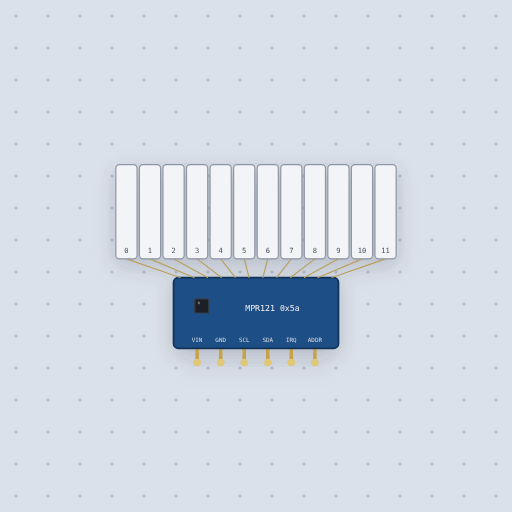
The Capacitive touch, MPR121 in brief
What it is, and every setting the properties panel gives it.
The MPR121 is the NXP chip with twelve capacitive touch electrodes on one I2C bus, here wired to twelve foil keys. The chip charges each electrode and measures the voltage it reaches; a finger adds capacitance, so the reading falls, and when it falls far enough below the electrode’s baseline the key is touched. The pins are VIN, 3 V to 5 V, GND, SCL, SDA, IRQ, open drain and low when the touches change, and ADDR, pulled down for address 0x5A. The address property is 0x5A by default, with 0x5B to 0x5D the others. The chip starts stopped and writing an electrode count to register 0x5E starts it. Hold a key to touch it, several at once if you like.
- Family
- Inputs
- Pins
- 6
- address
- 90
6 pins
Named as the editor names them, so a wire lands where you expect it.
How to build a touch piano with an MPR121 and an Arduino
VIN goes to 5 V and GND to ground, SCL to the Uno’s SCL and SDA to SDA, which are A5 and A4. The address is 0x5A. A piezo has pin 8 on one leg and ground on the other. IRQ is optional and the sketch does not use it.
The Adafruit library starts the chip, and cap.touched() returns a 12 bit mask with a bit for each electrode. The sketch plays the first touched key as a note with tone(), from C at 262 Hz up to B at 494 Hz, one octave, and stops with noTone() when no key is down. A key lights in the part’s window when the chip reports it touched, which is after its next sample, and only once a sketch has started the chip.
#include <Wire.h>
#include "Adafruit_MPR121.h"

const int PIEZO = 8;
const unsigned int NOTES[12] = {262, 277, 294, 311, 330, 349, 370, 392, 415, 440, 466, 494};
Adafruit_MPR121 cap = Adafruit_MPR121();
int playing = -1;

void setup() {
  Serial.begin(115200);
  if (!cap.begin(0x5A)) {
    Serial.println("no MPR121: check SDA, SCL and power");
    while (1) delay(10);
  }
}

void loop() {
  uint16_t touched = cap.touched();       // one bit a key
  int key = -1;
  for (int i = 0; i < 12; i++) {
    if (touched & (1 << i)) {
      key = i;
      break;
    }
  }
  if (key != playing) {
    playing = key;
    if (key < 0) noTone(PIEZO);
    else tone(PIEZO, NOTES[key]);
  }
}
Common Capacitive touch, MPR121 errors and fixes
Questions and answers
How many touches can the MPR121 read at once?
All twelve. Hold several keys at once and the touched mask has a bit for each.
What is the MPR121’s I2C address?
0x5A by default, 90. The address property can be 0x5B, 0x5C or 0x5D.
How does the MPR121 know a key is touched?
A finger adds capacitance, so the electrode’s reading falls. When it falls far enough below the baseline, past the electrode’s touch threshold, it is touched.
What is true about the Capacitive touch, MPR121, here
In its help article’s own words: what the simulation gets right, and where it stops.
Modeled
From the MPR121 datasheet:
Stop and run. The chip starts stopped. Writing a number of electrodes to the electrode configuration register (0x5E) starts it, and while it runs it ignores writes to the other registers, which is why a library writes its settings first.
The thresholds. Each electrode has its own touch and release threshold (0x41 to 0x5A); touched when the baseline less the reading is over the touch threshold, released when it is under the release threshold.
The status and IRQ. Two bytes of touch status at 0x00, and IRQ low until they
are read.
The sample interval. A new reading every 1 ms to 128 ms, as the second front-end register (0x5D) says: 16 ms after a reset, 1 ms once Adafruit's library sets it up.
Not modeled
The capacitance itself: an untouched electrode reads 700 counts and a finger takes 40 off, numbers chosen to clear the Adafruit library's default threshold of 12. The baseline does not drift, and the filter, debounce and auto-configuration registers are stored but do not change anything. Proximity sensing and the GPIO and LED drivers are not modeled.
From Capacitive touch, MPR121, in full.
See the Capacitive touch, MPR121 in a project
One built-in project uses it. It opens in the editor, already wired.
Where it turns up in a lesson
One lesson places it in its own circuit.
The boards it is shown on
This board has a built-in project with the Capacitive touch, MPR121 in it.
Arduino libraries for the Capacitive touch, MPR121
Built in, so the sketch compiles with nothing to install. Each page has the calls, the wiring and an example to run.
The rest of the bench
Every one of these is drawn and simulated the same way.
Wire up the Capacitive touch, MPR121
Open the editor and push it into the breadboard. It is free, and it runs on your own machine.