Thermocouple converter, MAX31855
A K-type thermocouple in 32 bits: the tip in quarter degrees, the cold junction, and open and short faults.
- 5 pins
- 2 settings
- In 1 project
- In 1 lesson
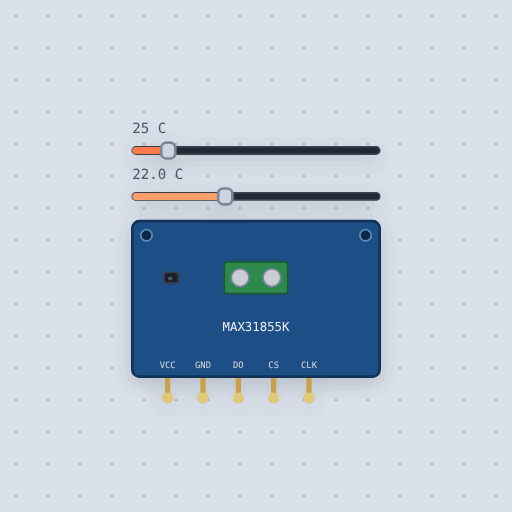
The Thermocouple converter, MAX31855 in brief
What it is, and every setting the properties panel gives it.
The MAX31855K reads a K-type thermocouple from -270 to 1800 degrees C, with its own cold junction temperature and fault bits, over read-only SPI. It is the MAX6675’s successor: 32 bits instead of 16, below zero temperatures, the board’s own temperature, and separate faults for an open probe and a probe shorted to either rail. The pins are VCC and GND, 3 to 5 V on the board, DO, the data out, high-Z while CS is high, CS, low to read, and CLK. The temperature property is the probe tip and ambient the board, the cold junction. Bits 31 to 18 are the tip in quarter degrees, bits 15 to 4 the board in sixteenths, and bits 2, 1 and 0 a short to VCC, a short to GND and an open probe. It converts every 100 ms.
- Family
- Sensors
- Pins
- 5
- temperature
- 25
- ambient
- 22
5 pins
Named as the editor names them, so a wire lands where you expect it.
CS is high.How to read a K-type thermocouple with a MAX31855 and an Arduino
VCC goes to 5 V and GND to ground. CLK goes to pin 7, CS to pin 6 and DO to pin 5, which is the order of the Adafruit library’s constructor, CLK, CS, DO. DO is the chip’s output, so it never goes to the board’s MOSI. In the project the probe tip is at 850 degrees and the board at 24, and the same Uno reads a MAX31865 on the SPI pins.
CS low stops the conversion and puts bit 31 on DO, then each falling edge of CLK puts the next, 32 in all. readCelsius() returns the tip and readInternal() the board. A fault returns NaN, so the sketch prints fault. The value only changes every 100 ms, so reading faster than ten times a second gains nothing. Move the two sliders while it runs.
#include <Adafruit_MAX31855.h>

Adafruit_MAX31855 kiln(7, 6, 5);   // CLK, CS, DO

void setup() {
  Serial.begin(9600);
  kiln.begin();
}

void loop() {
  double k = kiln.readCelsius();
  Serial.print("kiln ");
  if (isnan(k)) {
    Serial.print("fault");           // open probe or a short
  } else {
    Serial.print(k, 0);
    Serial.print(" C");
  }
  Serial.print("  board ");
  Serial.print(kiln.readInternal(), 1);
  Serial.println(" C");
  delay(500);
}
Common Thermocouple converter, MAX31855 errors and fixes
Questions and answers
What is the difference between the MAX31855 and the MAX6675?
The MAX31855 sends 32 bits, reads below zero, reports the board’s own temperature and has separate faults. The MAX6675 sends 16.
What range does the MAX31855K read?
-270 to 1800 degrees C with a K-type thermocouple.
Is the thermocouple’s nonlinearity modeled?
No. The chip assumes a straight line, and so does the model, so the tip reads exactly the slider.
What is true about the Thermocouple converter, MAX31855, here
In its help article’s own words: what the simulation gets right, and where it stops.
Not modeled
The K-type's nonlinearity (the chip assumes a straight line, and so does the model, so the tip reads exactly the slider), and the accuracy figures.
From MAX31855 thermocouple converter, in full.
See the Thermocouple converter, MAX31855 in a project
One built-in project uses it. It opens in the editor, already wired.
Where it turns up in a lesson
One lesson places it in its own circuit.
The boards it is shown on
This board has a built-in project with the Thermocouple converter, MAX31855 in it.
Arduino libraries for the Thermocouple converter, MAX31855
Built in, so the sketch compiles with nothing to install. Each page has the calls, the wiring and an example to run.
The rest of the bench
Every one of these is drawn and simulated the same way.
Wire up the Thermocouple converter, MAX31855
Open the editor and push it into the breadboard. It is free, and it runs on your own machine.