Barometric pressure, DPS310
Pressure to a fraction of a pascal and temperature over I2C, with up to 128 times oversampling.
- 4 pins
- 3 settings
- In 1 project
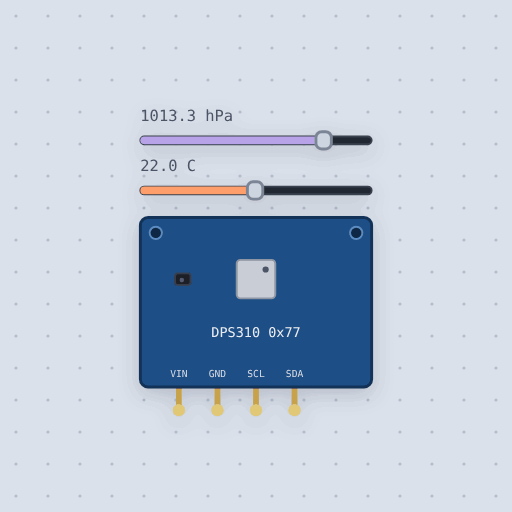
The Barometric pressure, DPS310 in brief
What it is, and every setting the properties panel gives it.
The Infineon DPS310 is a barometric pressure sensor that reads air pressure to a fraction of a pascal, plus temperature, over I2C at address 0x77 or 0x76. It is precise enough to tell a table from the floor by altitude, and it is the pressure sensor of drones and step counters. The board runs on 3 to 5 V on VIN, with GND for ground and SCL and SDA for I2C; the board carries the pull-ups. The model exposes three settings: the I2C address (0x76 or 0x77), pressure in hectopascals from 300 to 1200, and temperature, and the pressure and temperature sliders can be dragged while the circuit runs. Adafruit's library, shipped as Adafruit_DPS310.h, handles the raw 24-bit counts and the calibration coefficients. The model leaves out the FIFO, the interrupt pin, and the noise that oversampling removes.
- Family
- Sensors
- Pins
- 4
- address
- 119
- temperature
- 22
- pressure
- 1013.25
4 pins
Named as the editor names them, so a wire lands where you expect it.
How to use the DPS310 barometer with an Arduino Uno
The example project is a height meter, the two halves of a drone's altimeter. A VL53L1X laser ranger points straight down and measures the height above the floor, and the DPS310 barometer works out how far the circuit has climbed from the change in air pressure. The DPS310 is wired VIN to the Uno's 5V pin, GND to GND, SCL to A5 and SDA to A4, the I2C pins.
The sketch starts the ranger, then calls baro.begin_I2C(0x76), configures pressure and temperature at 16 Hz with 16 samples, throws away one reading taken at the old settings, and waits for the first at the new ones before storing the starting pressure. In the loop it reads the ranger distance, reads the pressure, and multiplies the pressure drop by 8.3 to get meters climbed, about 8.3 m per hectopascal near sea level, printing both numbers every 400 ms.
With default settings, the serial monitor printed: "Height meter ready" and "floor 1200 mm climbed 0.0 m". The floor figure is the laser distance to the floor, 1200 mm. The climb is 0.0 m because the pressure has not changed since the sketch started.
After the pressure slider on the DPS310 was dragged down by 12 hPa, the serial monitor printed: "floor 1200 mm climbed 99.6 m". The laser distance stays the same because nothing moved toward the floor, while the pressure drop of 12 hPa reads as about 100 m of climb. You can try dragging the distance slider on the VL53L1X too, which changes only the floor number.
// Height meter: a VL53L1X laser ranger looks straight down for the height
// above the floor, and a DPS310 barometer works out how far it has climbed
// from the change in air pressure, the way a drone keeps its height.
//
//   VL53L1X, DPS310   SDA -> A4   SCL -> A5   VIN -> 5 V   GND -> GND
//
// The laser is exact to a few millimeters but only reaches 4 m. The
// barometer reaches any height, but air pressure only falls about 12 Pa a
// meter near the ground, so it needs the DPS310's precision. Together they
// cover both.
//
// Things to try. Drag the distance slider on the VL53L1X. Then drag the
// pressure slider on the DPS310 down by 12 hPa: that is about 100 m of climb.

#include <Wire.h>
#include <VL53L1X.h>
#include <Adafruit_DPS310.h>

VL53L1X ranger;
Adafruit_DPS310 baro;
float startPressure = 0;

void setup() {
  Serial.begin(9600);
  Wire.begin();
  ranger.setTimeout(500);
  if (!ranger.init()) {
    Serial.println("No VL53L1X");
  }
  ranger.setDistanceMode(VL53L1X::Long);
  ranger.setMeasurementTimingBudget(50000);
  ranger.startContinuous(100);
  if (!baro.begin_I2C(0x76)) {
    Serial.println("No DPS310");
  }
  baro.configurePressure(DPS310_16HZ, DPS310_16SAMPLES);
  baro.configureTemperature(DPS310_16HZ, DPS310_16SAMPLES);
  // Throw away the reading taken at the old settings, then wait for the
  // first at the new ones.
  sensors_event_t temp, pressure;
  baro.getEvents(&temp, &pressure);
  while (!baro.temperatureAvailable() || !baro.pressureAvailable()) {
    delay(10);
  }
  baro.getEvents(&temp, &pressure);
Common Barometric pressure, DPS310 errors and fixes
Questions and answers
what is the dps310 i2c address
It is 0x77 or 0x76. The sketch calls begin_I2C(0x76).
how precise is the dps310
It reads air pressure to a fraction of a pascal, precise enough to tell a table from the floor by altitude.
what library reads the dps310 on an arduino
Adafruit's library, which Mokxi ships as Adafruit_DPS310.h. You call begin_I2C, configure pressure and temperature, then getEvents for pascals and degrees.
what does the dps310 model leave out
The FIFO, the interrupt pin, and the noise that oversampling removes.
What is true about the Barometric pressure, DPS310, here
In its help article’s own words: what the simulation gets right, and where it stops.
Not modeled
The FIFO and the interrupt pin, and the noise oversampling removes.
From DPS310 barometric pressure sensor, in full.
See the Barometric pressure, DPS310 in a project
One built-in project uses it. It opens in the editor, already wired.
The boards it is shown on
This board has a built-in project with the Barometric pressure, DPS310 in it.
The rest of the bench
Every one of these is drawn and simulated the same way.
Wire up the Barometric pressure, DPS310
Open the editor and push it into the breadboard. It is free, and it runs on your own machine.