BMP180 pressure sensor
Bosch’s older barometer on its GY-68 board: pressure and temperature, read through the Adafruit BMP085 library.
- 5 pins
- In 1 project
- In 1 lesson
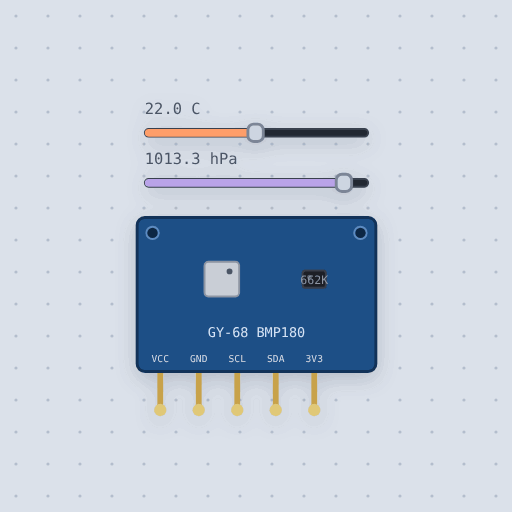
The BMP180 pressure sensor in brief
What it is, and where it sits on the bench.
The BMP180 is the Bosch barometric pressure and temperature sensor on the GY-68 breakout; the BMP085 is its predecessor with the same interface. The pins are VCC, 3.3 to 5 V, since the board has a 3.3 V regulator, GND, SCL and SDA, the I2C bus at address 0x77, and 3V3, the regulator’s output. The chip reports an uncompensated temperature and pressure, and eleven calibration words at 0xAA turn them into degrees and pascals with the datasheet’s integer arithmetic. The model carries the datasheet’s own example calibration, so the library reads back the sliders to 0.1 degrees C and a pascal. A temperature takes 4.5 ms and a pressure 4.5, 7.5, 13.5 or 25.5 ms by oversampling. The chip id is 0x55 at 0xD0. Two sliders set the temperature and the air pressure.
- Family
- Sensors
- Pins
- 5
5 pins
Named as the editor names them, so a wire lands where you expect it.
How to read a BMP180 barometer with an Arduino
VCC goes to the Uno’s 5 V and GND to ground. SCL goes to A5 and SDA to A4, and the sensor answers at I2C address 0x77. The board has a 3.3 V regulator, so it takes 3.3 to 5 V, and the 3V3 pin is the regulator’s output and stays free.
The Adafruit BMP085 library drives the BMP180. bmp.begin() checks the chip id, 0x55 at register 0xD0, and readTemperature(), readPressure() and readAltitude() do the datasheet’s arithmetic. The pressure is in pascals and the altitude is in meters against 101325 Pa. Drag the temperature and air pressure sliders and the printed values follow them to 0.1 degrees C and a pascal.
#include <Wire.h>
#include <Adafruit_BMP085.h>

Adafruit_BMP085 bmp;

void setup() {
  Serial.begin(9600);
  if (!bmp.begin()) {
    Serial.println("Could not find a valid BMP085 sensor, check wiring!");
    while (1) {
    }
  }
}

void loop() {
  Serial.print("Temperature = ");
  Serial.print(bmp.readTemperature(), 1);
  Serial.print(" *C  Pressure = ");
  Serial.print(bmp.readPressure());
  Serial.print(" Pa  Altitude = ");
  Serial.print(bmp.readAltitude(), 0);
  Serial.println(" meters");
}
Common BMP180 pressure sensor errors and fixes
Questions and answers
What is the BMP180’s I2C address?
0x77, with chip id 0x55 at register 0xD0.
Which library reads the BMP180?
Adafruit’s BMP085 library, which drives the BMP180 too. Mokxi ships it as Adafruit_BMP085.h.
What units does readPressure() return?
Pascals. readAltitude() returns meters against 101325 Pa.
What is true about the BMP180 pressure sensor, here
In its help article’s own words: what the simulation gets right, and where it stops.
Modeled
From the BMP180 datasheet:
Raw counts and a calibration. The chip reports an uncompensated temperature and pressure; eleven calibration words at 0xAA turn them into degrees and pascals with the datasheet's integer arithmetic. The model carries the datasheet's own example calibration and inverts that arithmetic, so the sheet's algorithm and the library read back the sliders to 0.1 C and a pascal.
Conversions take time. A temperature takes 4.5 ms and a pressure 4.5, 7.5, 13.5 or 25.5 ms by oversampling. The start-of-conversion bit reads 1 until it is done, and the data registers keep the last result until then.
Chip id and reset: 0x55 at 0xD0, and 0xB6 to 0xE0 resets it.
Not modeled
Noise, and so the averaging oversampling buys (a reading is exact at every setting, only slower), and the EOC pin of the bare chip.
From BMP180 pressure sensor, in full.
See the BMP180 pressure sensor in a project
One built-in project uses it. It opens in the editor, already wired.
Where it turns up in a lesson
One lesson places it in its own circuit.
The boards it is shown on
This board has a built-in project with the BMP180 pressure sensor in it.
Arduino libraries for the BMP180 pressure sensor
Built in, so the sketch compiles with nothing to install. Each page has the calls, the wiring and an example to run.
The rest of the bench
Every one of these is drawn and simulated the same way.
Wire up the BMP180 pressure sensor
Open the editor and push it into the breadboard. It is free, and it runs on your own machine.