Run AI-generated Arduino code online, before you wire anything
To run AI-generated Arduino code online, paste the whole chat reply into the box.
Drop it here, or paste it
Mokxi finds the code in it, picks the board, wires the parts the code names and opens it in a simulator in your browser. It works the same for a reply from ChatGPT, Claude, Gemini, Copilot, Perplexity or any other assistant. It is free, and you do not need an account to try it.
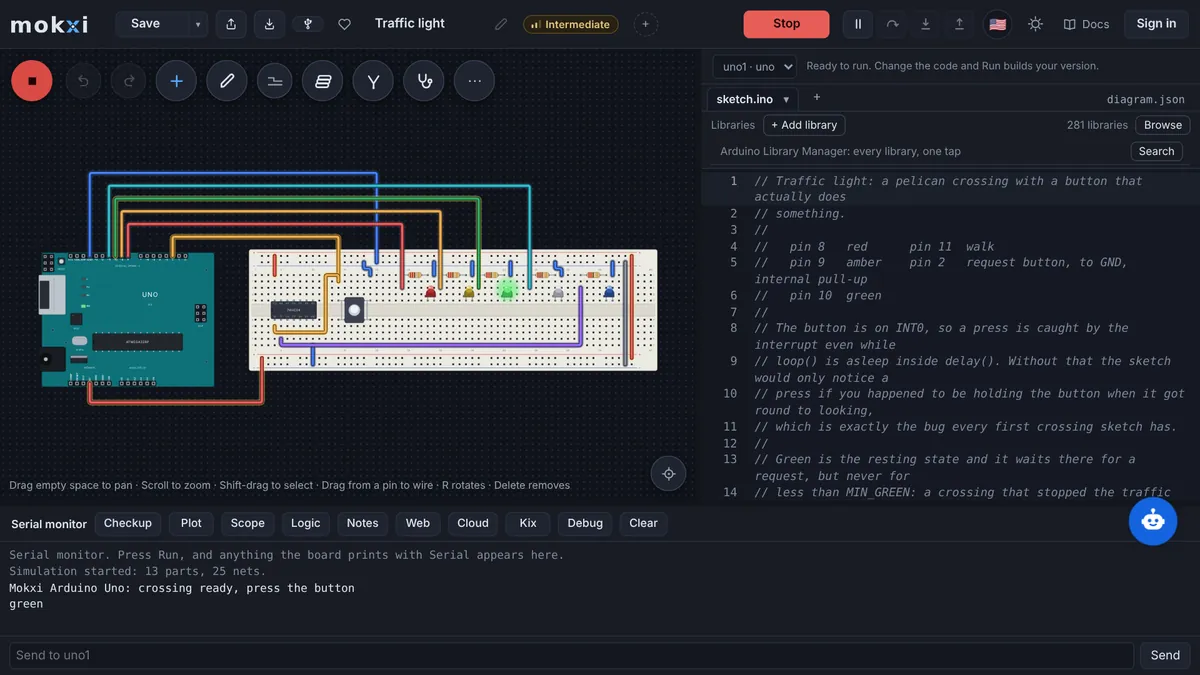
The button opens mokxi.com/app/#code= followed by a short sketch of the kind a chat writes: a servo that follows a knob. The editor reads the sketch out of the link, puts an Uno on the canvas and wires a servo to pin 9 and a potentiometer to A0.
Paste from ChatGPT or ClaudeCopy a prompt, say what to build, paste the answer.
- 1Copy the promptIt teaches your AI how to write a Mokxi project.
- 2Say what to buildPaste the prompt into ChatGPT, Claude, Gemini or Cursor and add what you want, like "a night light with a light sensor".
- 3Paste its answer hereThe whole reply is fine. It opens wired and ready to run.
Only have a photo or a screenshot of the circuit? Give your AI the picture with this prompt instead.
Your AI app supports MCP? Add the Mokxi server and it builds the link for you. How
From Tinkercad? Three stepsBring a circuit across wired, with its code.
- 1Export the circuitIn Tinkercad, open the circuit, press Export and download the .brd file. It has every part and wire.
- 2Download the codeOpen Code, switch to Text and press the download button for the .ino.
- 3Drop both hereChoose or drop the .brd and the .ino together: it opens wired, with the code on the board. No .brd? Paste the Component List with the code under it.
What Mokxi reads from an AI chat
The whole reply, copied as it is: the explanation, the code in its fenced block and the parts list. Mokxi takes the longest fenced block that reads as a sketch and leaves the prose around it.
Bare code with void setup() and void loop() in it, an int main(), or only an #include line at the top.
A reply that carries a Wokwi-style diagram.json beside the sketch. The two blocks open together as one wired project, and a stray comment or trailing comma in the JSON is mended and reported.
A project in the Mokxi AI format ("format": "mokxi-ai/1"), which an assistant writes when you hand it the prompt from Paste from ChatGPT or Claude under the box.
A link the assistant wrote: mokxi.com/app/#code= followed by the sketch, or mokxi.com/app/#ai= followed by a project. Those open the editor directly, with nothing to paste.
What comes across
The board the code was written for
An assistant does not always say which board it had in mind, so Mokxi reads the sketch for it: WiFi.h or ledcWrite points to an ESP32, ESP8266WiFi.h to a NodeMCU, Serial1 or pin 40 to a Mega 2560, pico/stdlib.h to a Pico, and a sketch with none of those marks to an Uno. The summary chip in the editor names the board the code landed on.
The circuit, wired from the code
Chat code usually comes with its wiring described in words, which nothing can run. Mokxi builds the circuit from the sketch itself: a Servo on its attach pin, a DHT11 or DHT22 on its data pin, a NeoPixel strip with its pixel count, an HC-SR04 on pins named trig and echo, I2C displays and sensors by their library, an LED with a 220 ohm resistor on each output and a button on each input.
A compiler that answers
Press Run and the sketch compiles in the browser tab. A function the assistant made up, a library that is not there or a pin name the board lacks comes back as the compiler’s own message with its line, before any part is bought.
Something to watch
The serial monitor sits under the canvas, LEDs light, servos turn and displays draw. You can see whether the code does what the chat said it would, and change a line and run it again.
What does not, and what happens instead
Wiring written as prose
A list such as "connect VCC of the sensor to 5V" is not read. The wires come from what the code does, and anything the code leaves unclear gets a "Not wired:" line with the reason, for you to place by hand.
Libraries Mokxi does not build with
A sketch that includes a library Mokxi lacks stops at the compiler, which names the header it could not find. The libraries page lists every one that is built in.
The room around a real board
Nothing here measures your desk. A simulated sensor reports the value you give it, and WiFi on a simulated ESP32 is a simulated network, so a sketch proves its logic here and not its range, its power draw or its soldering.
From an AI chat to Mokxi
Step 1
In the chat, press the copy button on the reply or on its code block. Either one works.
Step 2
Paste into the box above. The import starts by itself, and the editor opens with the board on the canvas and the parts wired to it.
Step 3
Press Run. If the build fails, the message names the line: take it back to the assistant, or ask Mokxi AI in the editor, which needs a free account.
Step 4
When it does what you wanted, create a free account to keep the project, or go on changing the code and running it.
Questions about importing from an AI chat
Can I run code from ChatGPT, Claude or Gemini without an Arduino?
Yes. Paste the reply into the box and the code runs on a simulated board in your browser, with the parts it uses wired beside it. No board, no cable and no install.
Do I need an account to test AI-generated code?
No. Pasting, wiring, compiling and running all work signed out. An account is free and is for keeping the project.
Which boards can AI-written code run on?
A pasted sketch opens on one of twenty: Uno R3, Nano, Mega 2560, Leonardo, Pro Mini, Uno R4 Minima, Uno R4 WiFi, ATtiny85, ESP32, ESP32-S3, ESP32-C3, ESP32-C6, ESP8266 NodeMCU, D1 mini, Pico, Pico W, XIAO SAMD21, Blue Pill, Black Pill F411 and Nucleo-F411RE.
Can an assistant give me a link that opens its code in Mokxi?
Yes. Ask it to link https://mokxi.com/app/#code= followed by the sketch, URL-encoded, and to add &board=esp32 (or uno, nano, mega2560, pico and so on) when it knows the board. The code rides in the part of the address after the #, which a browser does not send to any server.
Is AI-generated Arduino code safe to trust?
Treat it as a draft. Assistants invent functions, mix up pins between boards and leave out resistors. Running the draft here costs nothing and shows build errors and wrong behavior early. It does not prove the code is right for every case on real hardware.