ESP32-DevKitC V4 simulator, Espressif’s own ESP32 board
The ESP32-DevKitC V4 is Espressif’s board for the ESP32-WROOM-32: the classic dual-core ESP32, of which one Xtensa LX6 core runs here, on thirty-eight pins named by GPIO with a full inch between the rows. It has no user LED, and WiFi joins a simulated network.
- 6peripheral areas modeled
- 43projects ready to run
- Real timeon your own machine
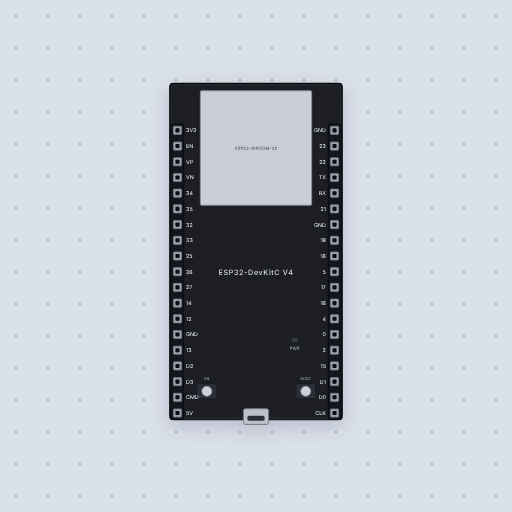
What is modeled
Taken from the board's own contract document and put in plain words, with what is missing beside it.
Modeled
- Core
- One Xtensa LX6 core, the DevKit V1 model whole
- GPIO
- Every pin on the header, numbered as the silkscreen numbers it; 34 to 39 are inputs only
- ADC1
- VP, VN and 32 to 35
- LEDC
- PWM on any output pin
- UART0
- TX and RX, wired to the serial monitor
- WiFi, simulated
- WiFi.h over a network written in software: no radio, no 802.11, and real internet only when you sign in and switch it on
Not modeled
- The second core, ADC2, the DAC and touch sensing.
- The six flash pins, D0 to D3, CMD and CLK, which are left open.
- A user LED: the board has none, so there is no LED_BUILTIN.
Open one and press Run
Each of these opens in the editor exactly as it is drawn here.
Every built-in project on the DevKitC V4
Each has its own page with the circuit running, the code and a parts list.
- DevKitC blinkBeginner
- MicroPython blink on ESP32 GPIO 2Beginner
- MicroPython button on GPIO 13 lights an LEDBeginner
- MicroPython table lamp: a button toggles an LEDBeginner
- MicroPython flowing light on a ten-segment LED barBeginner
- MicroPython breathing LED with PWM on GPIO 2Beginner
- MicroPython meteor light on eight PWM bar segmentsIntermediate
- MicroPython random colors on a common-anode RGB LEDBeginner
- MicroPython color wheel on a common-anode RGB LEDBeginner
- MicroPython NeoPixel: eight WS2812 LEDs on GPIO 2Beginner
- MicroPython rainbow on eight NeoPixelsBeginner
- MicroPython doorbell: a button sounds a buzzerBeginner
- MicroPython alarm siren on a passive buzzerIntermediate
- MicroPython serial print: the ESP32’s running timeBeginner
- MicroPython serial echo: input() on an ESP32Beginner
- MicroPython dimmer: a knob on GPIO 36, an LED on 25Beginner
- MicroPython color mixer: three knobs, one RGB LEDIntermediate
- MicroPython knob turns a NeoPixel rainbowIntermediate
- MicroPython night lamp: a photoresistor dims an LEDBeginner
- MicroPython thermometer: a thermistor on GPIO 36Intermediate
- MicroPython joystick on GPIO 36, 39 and 14Beginner
- MicroPython 74HC595 flowing light on an LED barIntermediate
- MicroPython 7-segment digit through a 74HC595Intermediate
- MicroPython four-digit display, multiplexedAdvanced
- MicroPython relay switches a motor: button on 15Intermediate
- MicroPython knob drives a motor both ways, L293DAdvanced
- MicroPython servo sweep on GPIO 15Beginner
- MicroPython knob points a servo: GPIO 34 and 15Beginner
- MicroPython stepper motor on a ULN2003 boardIntermediate
- MicroPython I2C LCD1602: hello and a counterIntermediate
- MicroPython HC-SR04 distance, timed by handIntermediate
- MicroPython HC-SR04 distance with a driver fileIntermediate
- MicroPython 4x4 keypad on an ESP32Intermediate
- MicroPython keypad door lock with a servoAdvanced
- MicroPython infrared remote codes on GPIO 15Intermediate
- MicroPython remote sets an LED’s brightnessIntermediate
- MicroPython DHT sensor: temperature and humidityBeginner
- MicroPython DHT readings on an I2C LCDIntermediate
- MicroPython motion sensor lights an LEDBeginner
- MicroPython MPU6050 accelerometer and gyroscopeIntermediate
- MicroPython WiFi station mode on an ESP32Beginner
- MicroPython WiFi access point mode on an ESP32Beginner
- MicroPython WiFi AP and station at once on an ESP32Intermediate
Tutorials that use this board
Each one ends in a running circuit, on this same board.
Questions
Is it free?
Yes. Every board and every part is on the free plan, with no account needed.
Is it the same as the ESP32 DevKit V1?
Same chip, other board: the DevKitC has thirty-eight pins an inch apart and no user LED; the DOIT DevKit V1 has thirty pins 0.9 inch apart and a blue LED on GPIO 2.
Why does Blink not compile?
Because the board has no user LED, so LED_BUILTIN is not defined, as in Arduino’s ESP32 Dev Module. Wire an LED to a pin; the built-in Blink uses GPIO 2.
Can I use D0 to D3, CMD and CLK?
No. They are the module’s SPI flash. Espressif says to leave them alone, and here they are not connected to anything a sketch can reach.
The other boards
Every one of these runs today, and every one is free.
A RISC-V chip at 160 MHz, on the real memory map.
The classic Arduino, with an ATmega328P running at 16 MHz.
The Uno’s chip on a small board that fits a breadboard.
The big Arduino, with 54 digital pins and four serial ports.
An Uno-shaped board whose chip does its own USB serial.
A second RISC-V board, with 31 pins and simulated WiFi.
The classic ESP32 at 240 MHz, with simulated WiFi.
The ESP32-S3 at 240 MHz, with USB serial and an RGB LED.
Try it on your own firmware
What you build here runs on the board on your desk, unchanged. Nothing to install and no account needed.