Temperature and humidity, SHT40
Temperature and humidity over I2C at 0x44, one-byte commands, 8.3 ms a precise reading.
- 4 pins
- 3 settings
- In 1 project
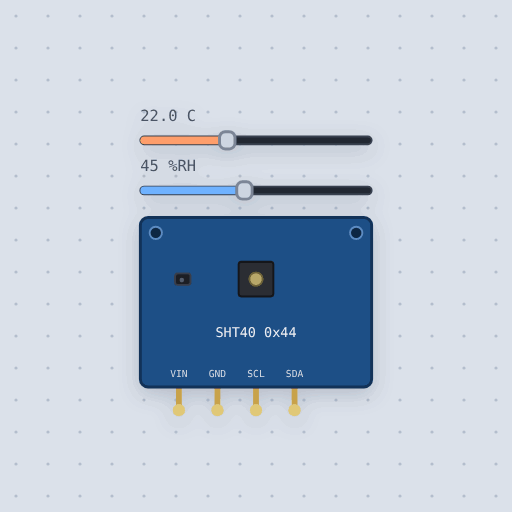
The Temperature and humidity, SHT40 in brief
What it is, and every setting the properties panel gives it.
The Sensirion SHT40 is a small, fast temperature and humidity sensor on an I2C breakout. It is the SHT31's smaller and faster successor, reading in about 8 ms where the SHT31 takes 15. It runs from a coin cell and carries a small heater to burn off condensation. Every reading comes with a checksum. Mokxi models its I2C behavior: one-byte commands from the datasheet, measure times of up to 8.3 ms, six-byte reads with CRC bytes, and the conversion formulas for temperature and humidity. The address can be 0x44, 0x45 or 0x46. Two sliders in the editor set the temperature and humidity while the circuit runs. The model does not cover the heater's warming, the general-call reset, or the accuracy figures. Common traps are reading too soon after a command and expecting the SHT31's two-byte commands, because the SHT4x takes one.
- Family
- Sensors
- Pins
- 4
- address
- 68
- temperature
- 22
- humidity
- 45
4 pins
Named as the editor names them, so a wire lands where you expect it.
How to use the SHT40 temperature sensor with an Arduino
The example project is the built-in "CO2 monitor". It wires an SHT40 to an Arduino Uno. An SCD41 counts the CO2 in the room every five seconds and the SHT40 reads the temperature and humidity. Both share one I2C bus: SDA goes to A4, SCL to A5, VIN to 5V, and GND to GND.
Run it with the default settings and the serial monitor prints: "CO2 monitor: the first reading comes in five seconds" then "CO2 650 ppm 23.0 C 45 %RH".
Change the settings to temperature 30 and humidity 70 and it prints: "CO2 monitor: the first reading comes in five seconds" then "CO2 650 ppm 30.0 C 70 %RH". Only the weather numbers moved. The CO2 value stayed the same.
Try dragging the CO2 slider on the SCD41 past 1000 ppm. The sketch will ask for a window.
// CO2 monitor: a Sensirion SCD41 counts the CO2 in the room and an SHT40
// reads the temperature and humidity, both on one I2C bus.
//
//   SCD41, SHT40   SDA -> A4   SCL -> A5   VIN -> 5 V   GND -> GND
//
// The SCD41 measures real CO2 by the sound a light pulse makes in it, and
// gives a new reading every five seconds. Fresh outdoor air is about 420 ppm;
// a closed room full of people climbs past 1000 ppm, and that is the point
// where a window wants opening.
//
// Things to try. Drag the CO2 slider on the SCD41 past 1000 ppm and watch
// the sketch ask for a window.

#include <Wire.h>
#include <SensirionI2cScd4x.h>
#include "Adafruit_SHT4x.h"

const uint16_t STUFFY_PPM = 1000;

SensirionI2cScd4x scd41;
Adafruit_SHT4x sht40;

void setup() {
  Serial.begin(9600);
  Wire.begin();
  scd41.begin(Wire, SCD41_I2C_ADDR_62);
  delay(30);
  scd41.stopPeriodicMeasurement();
  if (scd41.startPeriodicMeasurement() != NO_ERROR) {
    Serial.println("No SCD41");
  }
  if (!sht40.begin()) {
    Serial.println("No SHT40");
  }
  Serial.println("CO2 monitor: the first reading comes in five seconds");
}

void loop() {
  bool ready = false;
  scd41.getDataReadyStatus(ready);
  if (!ready) {
    delay(500);
    return;
  }
  uint16_t co2 = 0;
Common Temperature and humidity, SHT40 errors and fixes
Questions and answers
what is the sht40 address
It starts at 68, which is 0x44 on most boards. It can also be 0x45 or 0x46.
how do I connect the sht40 to an arduino uno
Wire VIN to 5V, GND to GND, SDA to A4, and SCL to A5. The board carries the I2C pull-ups.
sht40 vs sht31
The SHT40 is smaller and faster. It reads in 8 ms where the SHT31 takes 15. It also runs from a coin cell and has a small heater to burn off condensation.
which library works with the sht40
Adafruit's library, included as Adafruit_SHT4x.h. Sensirion's own SensirionI2cSht4x.h also works and has measureHighPrecision.
What is true about the Temperature and humidity, SHT40, here
In its help article’s own words: what the simulation gets right, and where it stops.
Not modeled
The heater's warming (the reading after a pulse is the slider's temperature), the general-call reset, and the accuracy figures.
From SHT40 temperature and humidity sensor, in full.
See the Temperature and humidity, SHT40 in a project
One built-in project uses it. It opens in the editor, already wired.
The boards it is shown on
This board has a built-in project with the Temperature and humidity, SHT40 in it.
Arduino libraries for the Temperature and humidity, SHT40
Built in, so the sketch compiles with nothing to install. Each page has the calls, the wiring and an example to run.
The rest of the bench
Every one of these is drawn and simulated the same way.
Wire up the Temperature and humidity, SHT40
Open the editor and push it into the breadboard. It is free, and it runs on your own machine.