Rotary dial
A telephone dial: its pulse contacts open once a step, ten a second, while the off-normal contacts say it is running.
- 3 pins
- In 1 project
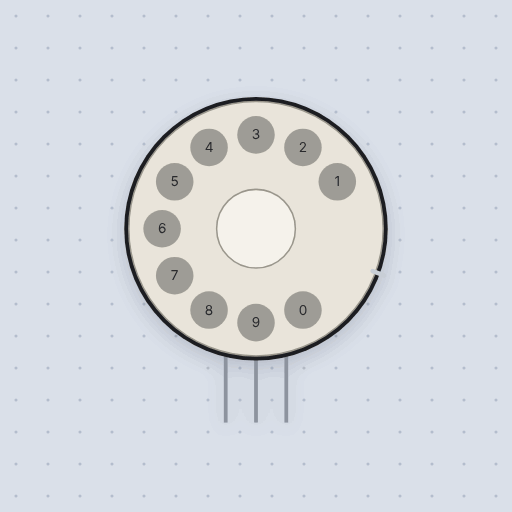
The Rotary dial in brief
What it is, and where it sits on the bench.
The rotary dial is a telephone’s rotary dial with its pulse and off-normal contacts brought out to three wires: GND, DIAL and PULSE. GND is the common of both sets of contacts. DIAL is the off-normal contact, joined to GND while the wheel is off its rest. PULSE is joined to GND at rest and let go once for each pulse. The pulse contacts open once a step, ten a second, so a 1 is one pulse and a 0 is ten. Click a hole to dial that digit; the digit shows in the middle until the wheel is home again. With INPUT_PULLUP on both pins, count how many times PULSE goes high while DIAL is low.
- Family
- Inputs
- Pins
- 3
3 pins
Named as the editor names them, so a wire lands where you expect it.
GND while the wheel is off its rest.GND at rest, let go once for each pulse.How to read an old telephone’s rotary dial with an Arduino
Three wires: GND to GND, DIAL to pin 2 and PULSE to pin 3, with INPUT_PULLUP on both. While the wheel runs back, the off-normal contacts hold DIAL low, and the pulse contacts open once a step: PULSE goes high once for 1 and ten times for 0, at ten pulses a second. Counting the pulses while DIAL is low, and reading the count when DIAL goes high again, gives the digit.
A real dial’s contacts bounce, so the project’s count only takes a pulse that has stayed high for a few milliseconds. Click the holes of the dial in the simulator, and the Uno builds up the number dialed.
The contacts are dry, so any board reads them with pull-ups. The pulses are slow, ten a second, so polling is enough.
const int DIAL_PIN = 2;
const int PULSE_PIN = 3;

int pulses = 0;
bool wasDialing = false;
bool wasHigh = false;

void setup() {
  pinMode(DIAL_PIN, INPUT_PULLUP);
  pinMode(PULSE_PIN, INPUT_PULLUP);
  Serial.begin(9600);
}

void loop() {
  bool dialing = digitalRead(DIAL_PIN) == LOW;
  bool high = digitalRead(PULSE_PIN) == HIGH;
  if (dialing && high && !wasHigh) pulses++;       // a pulse: PULSE let go
  if (wasDialing && !dialing) {                    // wheel home: read the digit
    Serial.println(pulses == 10 ? 0 : pulses);
    pulses = 0;
  }
  wasDialing = dialing;
  wasHigh = high;
}
Common Rotary dial errors and fixes
Questions and answers
How does a rotary phone dial send a digit?
As pulses: one for 1 up to ten for 0, at ten a second, while the off-normal contacts say the wheel is running.
What do DIAL and PULSE mean?
DIAL is the off-normal contact, joined to GND while the wheel is off its rest. PULSE is joined to GND at rest and let go once per pulse.
Why does zero take ten pulses?
The dial sends one pulse per step, so 1 is one and 0, the last hole, is ten.
What is true about the Rotary dial, here
In its help article’s own words: what the simulation gets right, and where it stops.
Modeled
The pulses: one for 1, nine for 9, ten for 0, at the governor's ten a second, each a 60 ms break and a 40 ms make, the ratio telephone exchanges were built for.
The off-normal contacts close as soon as the wheel leaves its rest and open a little after the last pulse, so "dialing" is never confused with a gap between pulses.
Not modeled
Contact bounce, and the speed a worn governor really runs at. The run from the finger stop back to the first pulse and from the last pulse to rest are a round 100 ms each.
From Rotary dial, in full.
See the Rotary dial in a project
One built-in project uses it. It opens in the editor, already wired.
The boards it is shown on
This board has a built-in project with the Rotary dial in it.
The rest of the bench
Every one of these is drawn and simulated the same way.
Wire up the Rotary dial
Open the editor and push it into the breadboard. It is free, and it runs on your own machine.