Ambient light, OPT3001
Light in lux with the eye's response, 0.01 to 83865 lux, auto-ranging over I2C.
- 5 pins
- 2 settings
- In 1 project
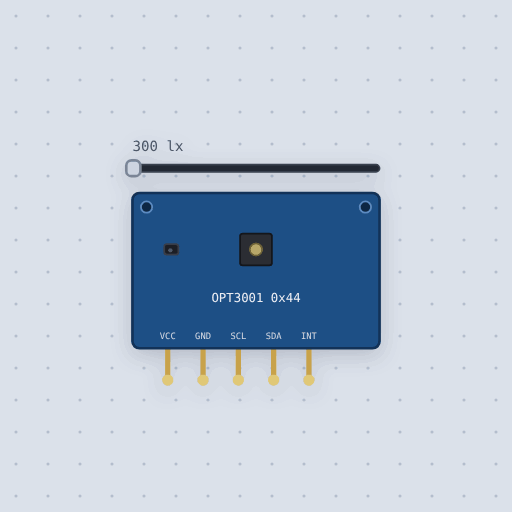
The Ambient light, OPT3001 in brief
What it is, and every setting the properties panel gives it.
The OPT3001 is a TI ambient light sensor that measures light in lux the way the eye sees it, from 0.01 to 83865 lux, over I2C at address 0x44. It auto-ranges, and its filter blocks infrared, so it agrees with the eye where a plain photodiode reads high under incandescent light. A screen dims with it; a greenhouse logs with it. It runs on 3 to 5 V, and the board carries the I2C pull-ups. Its INT pin can signal a limit or a conversion-ready interrupt, active low. The Mokxi model gives the part two settings: address, from 0x44 to 0x47, and lux, the light level, which a slider changes. The model leaves out the fault count and the spectral response: the slider is the reading. It powers up shut down, and continuous mode converts every 100 or 800 ms.
- Family
- Sensors
- Pins
- 5
- address
- 68
- lux
- 300
5 pins
Named as the editor names them, so a wire lands where you expect it.
How to use the OPT3001 with an Arduino Uno
The example project is an energy meter. An INA228 sits in series with a 12 V load and adds up the joules and coulombs through its shunt, the way a battery monitor counts what is left. The OPT3001 reads the light falling on the solar panel that would charge the battery. Its VCC goes to the Uno 5V pin, GND to GND, SCL to A5 and SDA to A4.
The sketch includes ClosedCube_OPT3001.h and Adafruit_INA228.h. In setup it starts the OPT3001 at address 0x44, writes a config with automatic range (0b1100) and continuous conversion every 100 ms (0b11), and prints "Energy meter". The INA228 chip keeps the running totals itself, so the loop only reads them. Every 500 ms it prints bus voltage, current, power, energy in joules, charge in coulombs (3600 coulombs is one amp hour), and the OPT3001 lux reading.
With default settings, the serial monitor printed: "Energy meter", "12.00 V 100 mA 1197 mW 0.65 J 0.055 C panel 19999 lux", "12.00 V 100 mA 1197 mW 1.29 J 0.108 C panel 19999 lux". The joules and coulombs climb as the 100 mA load runs; the panel reading stays at 19999 lux because the light level is fixed at the default.
After changing lux to 50000, the serial monitor printed: "12.00 V 100 mA 1197 mW 0.65 J 0.055 C panel 49992 lux", "12.00 V 100 mA 1197 mW 1.29 J 0.108 C panel 49992 lux". Only the panel reading changed, from 19999 to 49992 lux; the electrical numbers stayed the same. Drag the light slider yourself and watch the reading follow, or swap the lamp for another model and watch the totals climb faster or slower.
// Energy meter: an INA228 on a 12 V load adds up the energy and the charge
// that flow through its shunt, the way a battery monitor counts what is
// left, and an OPT3001 reads the light falling on the solar panel that
// would charge the battery.
//
//   INA228    SDA -> SDA   SCL -> SCL   in series with the load
//   OPT3001   SDA -> A4    SCL -> A5
//
// The chip keeps the running totals itself, so the sketch only reads them:
// joules of energy and coulombs of charge (3600 coulombs is one amp hour).
//
// Things to try. Swap the lamp for another model and watch the totals climb
// faster or slower. Drag the light slider on the OPT3001.

#include <Adafruit_INA228.h>
#include <ClosedCube_OPT3001.h>

Adafruit_INA228 meter;
ClosedCube_OPT3001 light;

void setup() {
  Serial.begin(9600);
  if (!meter.begin()) {
    Serial.println("No INA228");
    while (1);
  }
  meter.setShunt(0.015, 10.0);
  light.begin(0x44);
  OPT3001_Config config;
  config.rawData = 0;
  config.RangeNumber = 0b1100;      // automatic range
  config.ModeOfConversionOperation = 0b11;  // continuous, 100 ms
  light.writeConfig(config);
  Serial.println("Energy meter");
}

void loop() {
  delay(500);
  Serial.print(meter.getBusVoltage_V(), 2);
  Serial.print(" V  ");
  Serial.print(meter.readCurrent(), 0);
  Serial.print(" mA  ");
  Serial.print(meter.readPower(), 0);
  Serial.print(" mW  ");
  Serial.print(meter.readEnergy(), 2);
Common Ambient light, OPT3001 errors and fixes
Questions and answers
what is the opt3001 i2c address
0x44 by default. The address property can be set from 0x44 to 0x47.
what voltage does the opt3001 need
It runs on 3 to 5 V on the board. The board carries the I2C pull-ups.
what lux range can the opt3001 measure
It measures from 0.01 to 83865 lux, auto-ranging. In Mokxi the lux slider goes from 0 to 83865.6.
which library reads the opt3001 on an arduino
ClosedCube's library, which Mokxi ships as ClosedCube_OPT3001.h. Call begin(0x44), write the config, then readResult().lux.
What is true about the Ambient light, OPT3001, here
In its help article’s own words: what the simulation gets right, and where it stops.
Not modeled
The fault count and the spectral response: the slider is the reading.
From OPT3001 ambient light sensor, in full.
See the Ambient light, OPT3001 in a project
One built-in project uses it. It opens in the editor, already wired.
The boards it is shown on
This board has a built-in project with the Ambient light, OPT3001 in it.
The rest of the bench
Every one of these is drawn and simulated the same way.
Wire up the Ambient light, OPT3001
Open the editor and push it into the breadboard. It is free, and it runs on your own machine.