Touch TFT, 2.8 inch ILI9341 with FT6206
The 2.8 inch color TFT with a capacitive touch panel: the display on SPI, the touch on I2C.
- 11 pins
- In 1 project
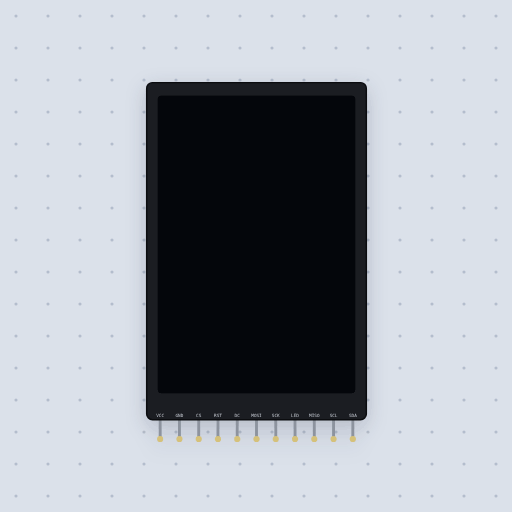
The Touch TFT, 2.8 inch ILI9341 with FT6206 in brief
What it is, and where it sits on the bench.
This is the 2.8 inch 240x320 ILI9341 TFT with an FT6206 capacitive touch controller, laid out like Adafruit’s cap-touch breakout. Unlike the resistive ili9341touch, whose XPT2046 is a second SPI device with its own T_CS, the touch here is I2C at 0x38 on two extra pins with 4.7 k pull-ups on the board. Its eleven pins are VCC, GND, CS, RST, DC, MOSI, SCK, LED, MISO, SCL and SDA. On an Uno the display takes 13 and 11 with CS on 10, DC on 9 and RST on 8, and the touch takes A5 and A4; on an ESP32 DevKit, SPI on 18 and 23 and I2C on 21 and 22. The display is the ILI9341 model. The FT6206 answers FocalTech’s registers: chip ID 0x06, vendor ID 0x11, the touch count in 0x02 and a 12-bit point with its down, contact or lift flag, read in one burst. The point comes back the other way up from the display, (239 - x, 319 - y), so a sketch that skips the flip draws in the opposite corner, and setRotation() does not turn the film. A second finger, gestures, the threshold and the INT and RST lines are not modeled.
- Family
- Displays
- Pins
- 11
11 pins
Named as the editor names them, so a wire lands where you expect it.
How to use a capacitive touch ILI9341 with an Arduino
Two buses on one board. The display is SPI: CS to pin 10, DC to 9, RST to 8, MOSI to 11 and SCK to 13, with VCC and LED on 5 V. The FT6206 touch controller is I2C at 0x38: SCL to A5 and SDA to A4. That is the difference from the resistive ILI9341 touch board, whose XPT2046 needs a chip select and an SPI bus of its own.
Call tft.begin() and ctp.begin(40), then in loop() check ctp.touched() and read ctp.getPoint(). The point is in pixels, but the film is laminated the other way up from the display’s memory, so the Cap touch sketch flips both axes with map() before it draws. Leave that out and the dot appears in the opposite corner; rotate the display and the touch does not rotate with it.
On an ESP32 DevKit the touch goes on GPIO 21 (SDA) and 22 (SCL), the pins Wire.begin() uses there; both libraries compile on every board here but the ATtiny85.
#include <SPI.h>
#include <Wire.h>
#include <Adafruit_GFX.h>
#include <Adafruit_ILI9341.h>
#include <Adafruit_FT6206.h>
Adafruit_ILI9341 tft(10, 9, 8);
Adafruit_FT6206 ctp;
void setup() {
  tft.begin();
  tft.fillScreen(ILI9341_BLACK);
  ctp.begin(40);
}
void loop() {
  if (!ctp.touched()) return;
  TS_Point p = ctp.getPoint();
  p.x = map(p.x, 0, 240, 240, 0);
  p.y = map(p.y, 0, 320, 320, 0);
  tft.fillCircle(p.x, p.y, 3, ILI9341_YELLOW);
}What is true about the Touch TFT, 2.8 inch ILI9341 with FT6206, here
In its help article’s own words: what the simulation gets right, and where it stops.
Modeled
The display is the ILI9341 model. The touch controller answers FocalTech's registers: the vendor and chip IDs the library checks, the touch count, and the point in pixels with its press, contact and lift flags, all read in one go. The point is the other way up from the display's memory, as on the real module, which is why every example turns it round.
Not modeled
A second finger, gestures, the threshold's effect, and the controller's interrupt and reset lines, which this board does not bring out.
From Touch TFT, 2.8 inch with capacitive touch, in full.
See the Touch TFT, 2.8 inch ILI9341 with FT6206 in a project
One built-in project uses it. It opens in the editor, already wired.
The boards it is shown on
This board has a built-in project with the Touch TFT, 2.8 inch ILI9341 with FT6206 in it.
Arduino libraries for the Touch TFT, 2.8 inch ILI9341 with FT6206
Built in, so the sketch compiles with nothing to install. Each page has the calls, the wiring and an example to run.
The rest of the bench
Every one of these is drawn and simulated the same way.
Wire up the Touch TFT, 2.8 inch ILI9341 with FT6206
Open the editor and push it into the breadboard. It is free, and it runs on your own machine.