Temperature and humidity, HTU21D
Temperature and humidity over I2C at 0x40 on the GY-21, hold and no-hold commands, a CRC on each reading, for Adafruit_HTU21DF.h.
- 4 pins
- 2 settings
- In 1 project
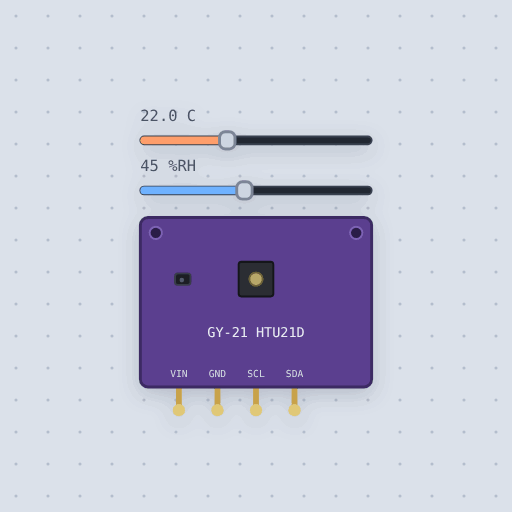
The Temperature and humidity, HTU21D in brief
What it is, and every setting the properties panel gives it.
The HTU21D is a temperature and humidity sensor from TE Connectivity, often seen on a GY-21 breakout board. It talks over I2C at the fixed address 0x40, and every reading comes back as two data bytes plus a CRC checksum. You ask for one reading at a time, wait while it measures, then read the bytes. The resolution is your choice, trading bits for speed. Mokxi simulates the part with two sliders, temperature in degrees Celsius and humidity in percent relative humidity, that you can move while the circuit runs. The next measurement reports the new values. The model also checks the CRC and returns NAN if a reading fails, and begin() fails with no answer at 0x40 if SDA, SCL or power are not connected. Clock stretching in Hold Master mode is not modeled, and the heater bit switches and reads back but does not warm the reading. One HTU21D per I2C bus, unless you add a switch like the TCA9548A.
- Family
- Sensors
- Pins
- 4
- temperature
- 22
- humidity
- 45
4 pins
Named as the editor names them, so a wire lands where you expect it.
How to use the HTU21D temperature sensor with an Arduino
The built-in project HTU21D temperature and humidity has this part wired to an Arduino Uno. A GY-21 HTU21D board sits on the Uno's I2C pins and is read with the Adafruit_HTU21DF library. The project runs beside these words and opens in the editor as it is drawn here. Wiring: VIN to 5V, GND to GND, SDA to A4, SCL to A5.
The sketch asks for a temperature and a humidity reading every second and prints both on the serial monitor. With the default settings, temperature 22 and humidity 45, the serial monitor shows: "HTU21D found at 0x40" and then "temperature 21.99 C, humidity 45.0 %RH".
Move the sliders while it runs. After changing the settings to temperature 30 and humidity 70, the serial monitor shows: "HTU21D found at 0x40" and then "temperature 30.00 C, humidity 70.0 %RH". Only the numbers changed. The sensor was found the same way both times.
Things to try from the sketch: unplug SDA, and begin() gets no answer at 0x40, so the sketch says so. Then work out the dew point from the two readings.
// An HTU21D temperature and humidity sensor on the GY-21 board.
//
// The HTU21D answers at 0x40. Each reading is a command, a wait while it
// measures (up to 50 ms for a 14-bit temperature, 16 ms for a 12-bit
// humidity) and three bytes back: two of data and a CRC that
// Adafruit_HTU21DF checks for you.
//
//   GY-21  VIN -> 5V, GND -> GND, SCL -> A5, SDA -> A4
//
// The board has its own 3.3 V regulator and pull-ups, so 5 V on VIN is fine.
// Every second the sketch prints both readings on the serial monitor. Move
// the temperature and humidity sliders while it runs.
//
// THINGS TO TRY. Unplug SDA: begin() gets no answer at 0x40 and the sketch
// says so. Then work out the dew point from the two readings.

#include <Wire.h>
#include "Adafruit_HTU21DF.h"

Adafruit_HTU21DF htu = Adafruit_HTU21DF();

void setup() {
  Serial.begin(9600);
  if (!htu.begin()) {
    Serial.println("No HTU21D at 0x40: check SDA, SCL and power.");
    while (1) {}
  }
  Serial.println("HTU21D found at 0x40");
}

void loop() {
  float temp = htu.readTemperature();
  float humidity = htu.readHumidity();
  Serial.print("temperature ");
  Serial.print(temp, 2);
  Serial.print(" C, humidity ");
  Serial.print(humidity, 1);
  Serial.println(" %RH");
  delay(1000);
}
Common Temperature and humidity, HTU21D errors and fixes
Questions and answers
what is the htu21d i2c address
It is fixed at 0x40. That means one HTU21D per I2C bus, unless you add an I2C switch like the TCA9548A.
can i power the gy-21 board with 5 volts
Yes. The board has its own 3.3 V regulator and pull-ups, so 5 V on VIN is fine.
which arduino library works with the htu21d
Use Adafruit's library. Mokxi ships it as Adafruit_HTU21DF.h. Call begin(), then readTemperature() and readHumidity().
can i change temperature and humidity while the simulation runs
Yes. The temperature and humidity sliders change them while the circuit runs, and the next measurement reports the new values.
What is true about the Temperature and humidity, HTU21D, here
In its help article’s own words: what the simulation gets right, and where it stops.
Not modeled
Clock stretching in Hold Master mode: no simulated board waits for it, so 0xE3 and
0xE5 behave like their No Hold twins and a read during the measurement is refused.
The heater's warming (the bit switches and reads back, but the reading stays the
slider's), the diagnostic open and short circuit codes, and the accuracy figures (the
real part is typically within 0.3 °C and 2 %RH). The datasheet does not say whether a
result can be read twice; here it is read once.
From HTU21D temperature and humidity sensor, in full.
See the Temperature and humidity, HTU21D in a project
One built-in project uses it. It opens in the editor, already wired.
The boards it is shown on
This board has a built-in project with the Temperature and humidity, HTU21D in it.
The rest of the bench
Every one of these is drawn and simulated the same way.
Wire up the Temperature and humidity, HTU21D
Open the editor and push it into the breadboard. It is free, and it runs on your own machine.