Fan module, L9110
A motor and propeller with its own H bridge: INA high spins it, INB high reverses it.
- 4 pins
- 2 settings
- In 2 projects
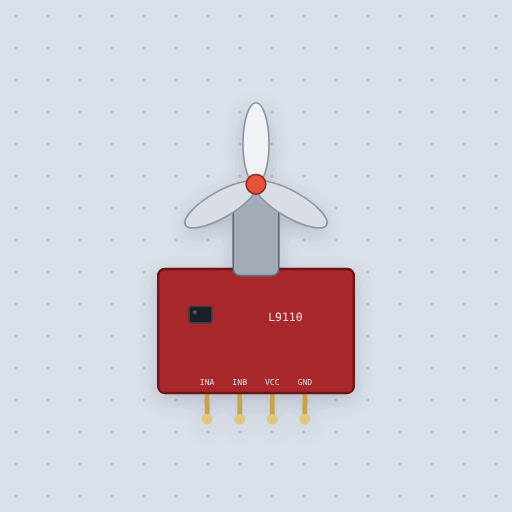
The Fan module, L9110 in brief
What it is, and every setting the properties panel gives it.
The L9110 fan module is a small DC motor with a soft propeller on a board that carries an L9110S H-bridge, so it runs straight from two board pins with no transistor. INA and INB are logic inputs; VCC feeds both the chip and the motor, anywhere from 2.2 to 6.5 volts, and GND joins the board’s ground. One input high with the other low spins the fan one way, the opposite spins it the other, and equal inputs brake rather than coast. analogWrite() on one input with the other held low sets the speed. Mokxi reads the inputs as the chip does, low under a quarter of VCC and high above 0.7 of it, so a 3.3 volt ESP32 driving a module on 5 volts never reaches a high: power the module from 3.3 volts too. The propeller follows the drive with a 250 millisecond lag, full speed is at the voltage property, and the readout shows percent of full speed, negative in reverse. Motor current, supply sag and the airflow itself are not modeled.
- Family
- Outputs
- Pins
- 4
- voltage
- 5
- inertia
- 250
4 pins
Named as the editor names them, so a wire lands where you expect it.
INB low) spins the fan one way.INA low) spins it the other way.How to use the L9110 fan module with an Arduino
The thermostat fan example puts INA on pin 5, a PWM pin, and INB on pin 4, held low, with the module’s VCC and GND on the Uno’s 5 volt rails. analogWrite(5, duty) then sets the speed, and moving the PWM to the other input with the first held low reverses the fan. Both inputs low, or both high, brakes it.
The sketch starts the fan at 40 percent, a duty of 102, rather than creeping up from zero, because a real small motor may not turn its propeller at a low duty. Drag the TMP36 warmer while it runs and watch the speed readout climb from 24 C to full at 32 C.
On a 3.3 volt board such as an ESP32, run the module from 3.3 volts too: on 5 volts its inputs need 3.5 volts to read high.
const int INA = 5;
const int INB = 4;
void setup() {
  pinMode(INA, OUTPUT);
  pinMode(INB, OUTPUT);
  digitalWrite(INB, LOW);
}
void loop() {
  analogWrite(INA, 180);   // about 70 percent
}What is true about the Fan module, L9110, here
In its help article’s own words: what the simulation gets right, and where it stops.
Modeled
The truth table. It is the L9110S's, with no coast: equal inputs brake.
The input levels. Low is under a quarter of VCC and high is over 0.7 of it, so a
3.3 V board on a 5 V module is not a high: 3.3 is under 3.5. Run the module from
3.3 V too, or use a 5 V board.
The supply. Under 2.2 V or over 6.5 V the chip does nothing here.
Not modeled
The motor's current and the sag it puts on a weak supply, and the air.
From Fan module, L9110, in full.
See the Fan module, L9110 in a project
2 built-in projects use it. Each opens in the editor, already wired.
The boards it is shown on
This board has a built-in project with the Fan module, L9110 in it.
The rest of the bench
Every one of these is drawn and simulated the same way.
Wire up the Fan module, L9110
Open the editor and push it into the breadboard. It is free, and it runs on your own machine.