E-paper display, 2.9 inch
296x128 black and white e-paper over SPI. Three seconds to refresh, and it keeps the picture with no power.
- 8 pins
- In 1 project
- In 1 lesson
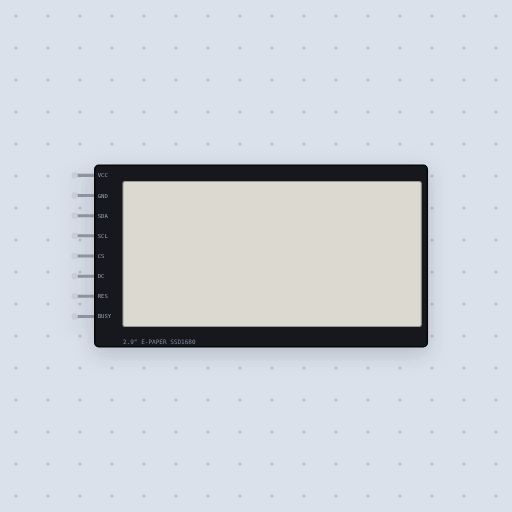
The E-paper display, 2.9 inch in brief
What it is, and where it sits on the bench.
The 2.9 inch e-paper display is a black and white module on the Solomon Systech SSD1680, 296 by 128 pixels, over SPI: the Waveshare 2.9 inch V2 and the WeAct 2.9 inch boards. The pins are VCC and GND, 2.2 to 3.7 V, SDA, the SPI data in, SCL, the clock, CS, active low, DC, low for a command and high for its data, RES, reset and active low, and BUSY, high while the controller works, above all during a refresh. It is the same SSD1680 model as the 2.13 inch panel, with the two RAMs, the RAM window and counters, data entry modes, reset and deep sleep. Mokxi ships GxEPD2 as GxEPD2_BW.h with the GxEPD2_290_BS, GxEPD2_290_T94 and GxEPD2_290_T94_V2 panels.
- Family
- Displays
- Pins
- 8
8 pins
Named as the editor names them, so a wire lands where you expect it.
DIN on the Waveshare board).CLK).RST).How to use a 2.9 inch e-paper display with an Arduino and GxEPD2
The module runs on 3.3 V, so VCC goes to the Uno’s 3V3 pin, not 5 V: its supply is 2.2 to 3.7 V. SDA goes to pin 11 and SCL to pin 13, the Uno’s SPI pins, CS to 10, DC to 9, RES to 8 and BUSY to 7. A button on pin 2 marks the price down.
The GxEPD2 constructor takes CS, DC, RES and BUSY in that order. The sketch draws a label with a full window, then redraws only the price with a partial window when the button is pressed, which is faster than refreshing the whole panel. BUSY is high while the controller works, so the library waits on it. Call hibernate() when you are done to put the panel in deep sleep.
#include <GxEPD2_BW.h>

GxEPD2_BW<GxEPD2_290_BS, 50> display(GxEPD2_290_BS(10, 9, 8, 7));  // CS, DC, RES, BUSY

void setup() {
  display.init();
  display.setRotation(1);
  display.firstPage();
  do {
    display.fillScreen(GxEPD_WHITE);
    display.setCursor(10, 20);
    display.print("Hello");
  } while (display.nextPage());
  display.hibernate();
}

void loop() {
}
Common E-paper display, 2.9 inch errors and fixes
Questions and answers
What resolution is the 2.9 inch e-paper?
296 by 128 pixels, black and white, on the SSD1680.
What does hibernate() do on the e-paper display?
It puts the controller into deep sleep once the picture is drawn, which the model supports along with reset and the two RAMs.
Which library does Mokxi use for e-paper?
GxEPD2, as GxEPD2_BW.h, with the GxEPD2_290_BS, GxEPD2_290_T94 and GxEPD2_290_T94_V2 panels.
What is true about the E-paper display, 2.9 inch, here
In its help article’s own words: what the simulation gets right, and where it stops.
Modeled
It is the same SSD1680 model as the 2.13 inch panel, on 128 sources and 296 gates:
the two RAMs, the RAM window and counters, data entry modes, reset and deep sleep,
and a picture that changes only when a refresh finishes, with BUSY high while it
runs: about 3 s for a full refresh and 0.3 s for a partial one, Waveshare's typical
times. The picture stays with the power off.
Not modeled
The flashing of a full refresh, ghosting, the temperature's effect on the refresh time, and reading the RAM back.
From E-paper display, 2.9 inch, in full.
See the E-paper display, 2.9 inch in a project
One built-in project uses it. It opens in the editor, already wired.
Where it turns up in a lesson
One lesson places it in its own circuit.
The boards it is shown on
This board has a built-in project with the E-paper display, 2.9 inch in it.
Arduino libraries for the E-paper display, 2.9 inch
Built in, so the sketch compiles with nothing to install. Each page has the calls, the wiring and an example to run.
The rest of the bench
Every one of these is drawn and simulated the same way.
Wire up the E-paper display, 2.9 inch
Open the editor and push it into the breadboard. It is free, and it runs on your own machine.