DFPlayer Mini MP3 module
Numbered files from a microSD card, played on command over serial, with BUSY low while one plays.
- 16 pins
- 3 settings
- In 4 projects
- In 3 lessons
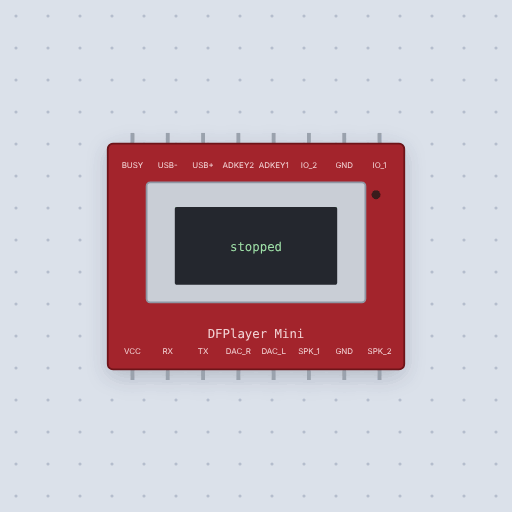
The DFPlayer Mini MP3 module in brief
What it is, and every setting the properties panel gives it.
The DFPlayer Mini is a microSD slot, a decoder and a small amplifier on a 16-pin board, told what to play over a 9600 baud serial link. VCC takes 3.2 to 5 volts, the board sends on RX and listens on TX, usually through SoftwareSerial on an Uno, and BUSY goes low while a file plays. Its logic is 3.3 volts, so RX driven from a 5 volt pin wants a 1k resistor in series, and files play in the order they were copied to the card, not by name. Mokxi implements the manual’s ten-byte frames, 7E FF 06, the command, the ack flag, the parameter, a checksum and EF, and answers a bad checksum with an error. After power-up it spends 600 milliseconds reading the card and answers busy until then. Play by number and in folders, pause, loops, random play, volume from 0 to 30, EQ and the state and count queries all work through DFRobot’s library, and the end of each file is reported twice. There is no sound: the card is the tracks, folders and seconds properties, and the speaker outputs stay silent.
- Family
- Clocks and links
- Pins
- 16
- tracks
- 10
- folders
- 2
- seconds
- 20
16 pins
Named as the editor names them, so a wire lands where you expect it.
How to use a DFPlayer Mini with an Arduino
Run a SoftwareSerial at 9600 baud on pins 10 and 11: TX from the module to pin 10, and pin 11 to RX through a 1k resistor, because its inputs are 3.3 V. BUSY on pin 3 reads LOW while a file plays. Give player.begin() the serial port and check what it returns before calling volume() and play().
The card here holds four files of three seconds each, set by the part’s tracks and seconds properties. To play files in turn, wait for player.available() and a DFPlayerPlayFinished report. The module sends that report twice, so check the file number before moving on, or the second report moves the sketch on a second time.
#include <SoftwareSerial.h>
#include <DFRobotDFPlayerMini.h>
SoftwareSerial link(10, 11);
DFRobotDFPlayerMini player;
void setup() {
  link.begin(9600);
  if (!player.begin(link)) while (true) {}
  player.volume(20);
  player.play(1);
}
void loop() {}What is true about the DFPlayer Mini MP3 module, here
In its help article’s own words: what the simulation gets right, and where it stops.
Modeled
From the DFPlayer Mini manual:
The frames: ten bytes, 7E FF 06, the command, the ack flag, the parameter, a
checksum and EF, at 9600 baud 8N1. A bad checksum or frame is answered with an
error.
Start-up: it reads the card, then reports it online; commands before then are answered busy.
The commands: play by number, in folders and the MP3 folder, next and
previous, pause, resume and stop, looping one file or all, random play, volume, EQ,
sleep and reset, each acknowledged when asked. A file past the card is an error.
The queries: state, volume, EQ, file and folder counts, and the current file.
The end of a file is reported twice, as the module does, and BUSY is low
while one plays.
Not modeled
Sound. There are no recordings in a simulator, so the speaker and DAC outputs stay silent and the card is a count of files and a length. USB, the ADKEY ladder and the advertisement feature are accepted and ignored.
From DFPlayer Mini, in full.
See the DFPlayer Mini MP3 module in a project
4 built-in projects use it. Each opens in the editor, already wired.
Where it turns up in a lesson
3 lessons place it in their own circuits.
The boards it is shown on
This board has a built-in project with the DFPlayer Mini MP3 module in it.
Arduino libraries for the DFPlayer Mini MP3 module
Built in, so the sketch compiles with nothing to install. Each page has the calls, the wiring and an example to run.
The rest of the bench
Every one of these is drawn and simulated the same way.
Wire up the DFPlayer Mini MP3 module
Open the editor and push it into the breadboard. It is free, and it runs on your own machine.