Coin acceptor, CH-926
On 12 V, a burst of pulses on COIN for each coin it knows, pulling the line low for each.
- 4 pins
- 2 settings
- In 1 project
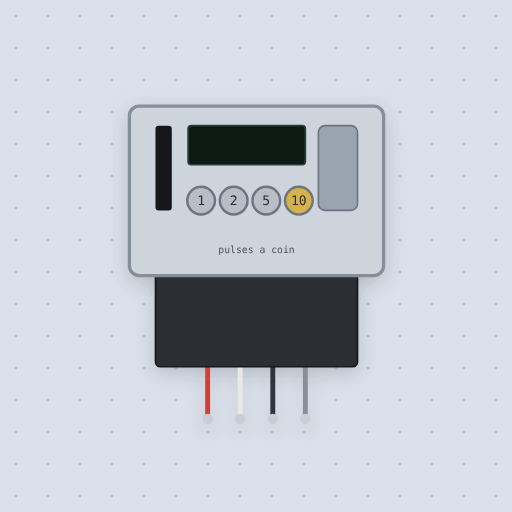
The Coin acceptor, CH-926 in brief
What it is, and every setting the properties panel gives it.
The CH-926 is a programmable coin acceptor with a chrome face, a coin slot and a return lever, and a four-wire harness. It is taught up to six kinds of coin by sample and told how many pulses each is worth; a coin it knows drops through and COIN sends that many pulses, while anything else falls out of the return. The board never learns which coin it was, only a count. The model wires DC12V to a 12 V supply, COIN to an input with a pull-up, and GND to ground. Its pulse property sets each pulse's length in milliseconds, 50 by default, with a gap of the same length, and nc flips the output as the NO/NC switch does. The model does not include teaching the coins, which happens on the unit's own buttons, the inhibit input some versions have, or the time a real one takes to look at a coin. Click a coin under the face to drop it in. Coins are worth 1, 2, 5 and 10 pulses.
- Family
- Inputs
- Pins
- 4
- pulse
- 50
- nc
- false
4 pins
Named as the editor names them, so a wire lands where you expect it.
GND for each pulse.How to use the CH-926 coin acceptor with an Arduino Uno
The example project is Piggy bank. A CH-926 coin acceptor counts each coin's pulses and a TM1637 display adds up the savings in dollars and cents. DC12V goes to the 12 V supply, COIN goes to Uno pin 2, and GND goes to the Uno's GND, shared with the 12 V supply. The display's CLK and DIO go to pins 13 and 12. The acceptor is taught that a nickel sends 1 pulse, a dime 2, a quarter 5 and a dollar coin 10.
The sketch enables the Uno's pull-up on pin 2 and attaches an interrupt that counts falling edges. A burst is over once the line has been quiet longer than any gap inside one, so it waits 200 ms. It then adds up the burst's count, looks up its value in cents, prints it to the serial monitor and shows the total on the display. An unknown count prints "not a coin I know". While it runs, click a coin under the acceptor's face to drop it in.
With default settings, the serial monitor printed: "Mokxi Arduino Uno: piggy bank", "saved $0.00". The first line is the sketch starting and the second is the empty total at power on, before any coin is dropped.
After a coin worth 5 pulses was dropped in, the serial monitor printed: "5 pulses: 25 cents, saved $0.25". The sketch counted five pulses, looked up 25 cents, and added it to the total. Coins are worth 1, 2, 5 and 10 pulses here. Drop them a moment apart, or two read as one long burst.
// Piggy bank: a CH-926 coin acceptor and a TM1637 display.
//
//   pin 2    the acceptor's COIN (white), with the Uno's pull-up
//   GND      the acceptor's GND, shared with its 12 V supply
//   pins 13, 12  the display's CLK and DIO
//
// The acceptor is taught each coin and the pulses it is worth; here a nickel
// sends 1, a dime 2, a quarter 5 and a dollar coin 10. COIN pulls low for
// each pulse, so an interrupt counts falling edges, and a burst is over once
// the line has been quiet for longer than any gap inside one (the acceptor's
// gaps are as long as its 50 ms pulses here, so 200 ms is plenty).

#include <TM1637Display.h>

const int COIN = 2;
const int CLK = 13;
const int DIO = 12;
const unsigned long QUIET_MS = 200;

TM1637Display display(CLK, DIO);

volatile int pulses = 0;
volatile unsigned long lastPulse = 0;
long cents = 0;

void onPulse() {
  pulses++;
  lastPulse = millis();
}

int centsFor(int count) {
  switch (count) {
    case 1: return 5;
    case 2: return 10;
    case 5: return 25;
    case 10: return 100;
    default: return 0;
  }
}

void show() {
  display.showNumberDecEx((int)(cents % 10000), 0b01000000, true);
}

void setup() {
Common Coin acceptor, CH-926 errors and fixes
Questions and answers
how many coins can a ch-926 be taught
Up to six kinds of coin, taught by sample on the unit's own buttons. The board never learns which coin it was, only a count.
what voltage does the ch-926 coin acceptor need
A 12 V supply on DC12V. Under 10.8 V it is not running and a coin falls back out.
does the ch-926 coin output need a pull-up
Yes. COIN is an open collector that pulls to GND for each pulse, so it needs INPUT_PULLUP on the board or a resistor to 5 V, never to 12 V.
what does the pulse setting do on the coin acceptor
It is the length of each pulse in milliseconds, 50 by default, with a gap of the same length after it. The speed switch on a real one sets it; match the two.
What is true about the Coin acceptor, CH-926, here
In its help article’s own words: what the simulation gets right, and where it stops.
Modeled
The supply. Under 10.8 V (12 V less 10%) it is not running, and a coin falls back out.
The output. An open collector, so COIN needs a pull-up: INPUT_PULLUP on the
board, or a resistor to 5 V. Never to 12 V.
Coins in a queue. A coin dropped while another is still sending waits for it to finish. Drop them a moment apart: two clicked at once follow each other by a single gap and read as one long burst.
Not modeled
Teaching the coins, which happens on the unit's own buttons; the inhibit input some versions have; and the time a real one takes to look at a coin.
From Coin acceptor, CH-926, in full.
See the Coin acceptor, CH-926 in a project
One built-in project uses it. It opens in the editor, already wired.
The boards it is shown on
This board has a built-in project with the Coin acceptor, CH-926 in it.
Keep going
The rest of the bench
Every one of these is drawn and simulated the same way.
Wire up the Coin acceptor, CH-926
Open the editor and push it into the breadboard. It is free, and it runs on your own machine.