Open an .ino file online and run it without an Arduino
Open an .ino file online, or upload the whole Arduino sketch folder, and Mokxi compiles it in your browser and runs it on a simulated board with no Arduino plugged in.
Drop it here, or paste it
The sketch is read for the parts it talks to, and those are placed and wired to the pins it names. If all you have is the code, paste that instead.
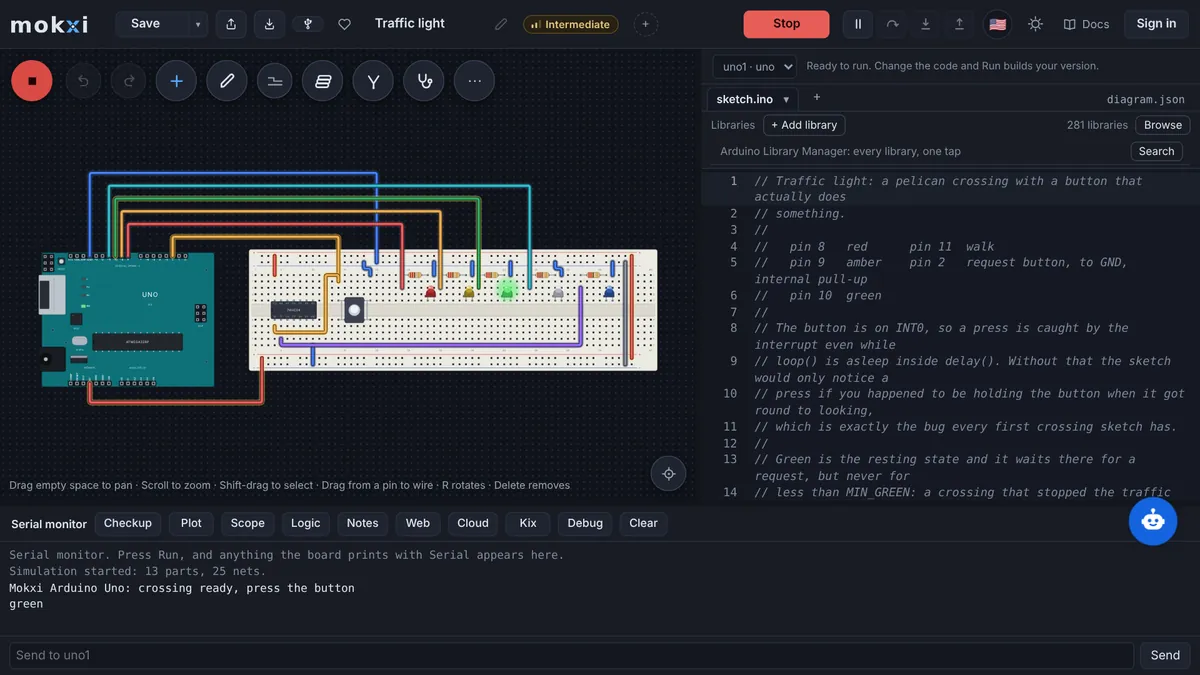
A servo pointer that follows an analog reading: the sketch attaches a servo on pin 9, reads A0 and maps the value to an angle. Mokxi wires a servo on 9 and a potentiometer on A0 (the pin is only called sensorPin, so it cannot tell it was a light sensor); turn the knob and the horn follows.
Paste from ChatGPT or ClaudeCopy a prompt, say what to build, paste the answer.
- 1Copy the promptIt teaches your AI how to write a Mokxi project.
- 2Say what to buildPaste the prompt into ChatGPT, Claude, Gemini or Cursor and add what you want, like "a night light with a light sensor".
- 3Paste its answer hereThe whole reply is fine. It opens wired and ready to run.
Only have a photo or a screenshot of the circuit? Give your AI the picture with this prompt instead.
Your AI app supports MCP? Add the Mokxi server and it builds the link for you. How
From Tinkercad? Three stepsBring a circuit across wired, with its code.
- 1Export the circuitIn Tinkercad, open the circuit, press Export and download the .brd file. It has every part and wire.
- 2Download the codeOpen Code, switch to Text and press the download button for the .ino.
- 3Drop both hereChoose or drop the .brd and the .ino together: it opens wired, with the code on the board. No .brd? Paste the Component List with the code under it.
What Mokxi reads from the Arduino IDE
An .ino or .pde file, alone or with the tabs the Arduino IDE keeps beside it (.ino, .h, .cpp, .c).
The sketch folder itself, or a zip of it, including a sketch.yaml from the IDE 2 or arduino-cli or a sketch.json from an Arduino Cloud download.
Code pasted into the box: anything with void setup(), void loop(), int main() or an #include line, even inside the Markdown fences of a chat reply or a forum post.
A .cpp, .c, .h or .txt file, or a file with no extension, that holds setup(): Mokxi renames it to <name>.ino, since the IDE opens a sketch only from an .ino.
A link to an .ino in a public GitHub repository or gist (the GitHub page covers those links).
What comes across
Every tab of the sketch
Each .ino, .h, .cpp and .c file next to the main sketch becomes a file of the board’s project, and the .ino tabs are joined the way the IDE joins them at build time. A src/main.cpp with no platformio.ini beside it is taken as the sketch and renamed sketch.ino, with the headers in include/ as its tabs and each lib/<Name>/ folder as one of its libraries.
The board, guessed from includes and pins
The IDE never writes the board into a sketch, so Mokxi reads the code for it. ESP8266WiFi.h, ESP8266WebServer.h, ESP8266HTTPClient.h or espnow.h means an ESP8266 NodeMCU; a CONFIG_IDF_TARGET_ESP32S3, ESP32C3 or ESP32C6 check picks that chip; WiFi.h, ESP32Servo.h, BluetoothSerial.h, esp_now.h, WebServer.h, HTTPClient.h, Preferences.h or esp_wifi.h, or a ledcSetup, ledcWrite, touchRead, dacWrite, xTaskCreate or esp_ call, means an ESP32; pico/stdlib.h, hardware/gpio.h or gpio_put a Pico; USER_BTN, LED_GREEN or ARDUINO_NUCLEO_F411RE a Nucleo-F411RE; PA0-style pin names or PC13 a Blue Pill; TinyWireM.h, TinyWireS.h, ATtiny85 or pins PB0 to PB5 an ATtiny85; Keyboard.h or Mouse.h a Leonardo; Serial1 to Serial3, A8 to A15 or pins 22 to 53 a Mega 2560; A6 or A7 a Nano; and a sketch with none of those an Uno. The guess is preselected in a Board list of twenty: Uno R3, Nano, Mega 2560, Leonardo, Pro Mini, Uno R4 Minima, Uno R4 WiFi, ATtiny85, ESP32, ESP32-S3, ESP32-C3, ESP32-C6, ESP8266 NodeMCU, D1 mini, Pico, Pico W, XIAO SAMD21, Blue Pill, Black Pill F411 and Nucleo-F411RE.
A circuit wired from the code
A sketch arrives with no diagram, so Mokxi builds one from the libraries it includes, the objects it declares and the pin calls it makes: a Servo on its attach pin; a DHT11 or DHT22; a NeoPixel strip with its pixel count, from Adafruit_NeoPixel or FastLED; a DS18B20 with a 4.7k pullup; an IR receiver; an HC-SR04 through NewPing or through pins named trig and echo; a parallel LiquidCrystal on its six pins; I2C devices by their library (16x2 and 20x4 LCDs, SSD1306 OLEDs, BME280, BMP280, BMP180, MPU6050, DS3231, DS1307, BH1750, AHT20, SHT31, INA219, VL53L0X, ADS1115, PCA9685, SH1106). For plain pins: an output gets an LED with a 220 ohm resistor, or a relay or buzzer when the pin’s name or a tone() call says so; an input gets a button with a 10k pulldown, to ground for INPUT_PULLUP, or a PIR when the name says motion; an analogRead gets a potentiometer, a light sensor, an LM35 or a TMP36 by the pin’s name. The report then reads like "We wired: servo on 9, LED on 13 (with 220 ohm)".
The board and libraries the project file names
When a sketch.yaml (default_fqbn, or a profile’s fqbn) or a sketch.json (cpu.fqbn) comes along, its FQBN is matched to a Mokxi board and the note says which file builds for what. The libraries those files list are checked against Mokxi’s, together with the depends= line of each library bundled in a libraries/ folder.
What does not, and what happens instead
Files in folders inside the sketch
A Mokxi project is flat, so a file under src/ or any other subfolder of an Arduino sketch is left out and named in the report. Move it beside the main .ino and include it by name, and it comes along next time.
Wiring Mokxi is not sure of
Anything seen but not placed gets its own "Not wired:" line with the reason: a pin this board does not have, a pin already taken by another part, a LiquidCrystal in 8-bit mode, an SPI OLED, LED_BUILTIN (the board has its own), or pins 0 and 1 while Serial is in use. A sketch that names no parts at all opens as the bare board for you to wire.
Arduino IoT Cloud connections
The thingProperties.h of an Arduino Cloud sketch is kept as a tab, but a simulated board has no way to reach Arduino IoT Cloud, and its cloud variables therefore hold their declared starting values while everything else in the sketch runs.
A board Mokxi does not have
If sketch.yaml or sketch.json builds for a board Mokxi lacks, the report names the FQBN and asks you to pick the nearest from the list. Code that leans on that board’s own peripherals may then fail to compile, and the compiler’s message says where.
From the Arduino IDE to Mokxi
Step 1
In the Arduino IDE, open the sketch and choose Sketch, Show Sketch Folder: the .ino and any tabs are in that folder.
Step 2
Drop the .ino, the folder or a zip of it into the box above, or paste the code. The line under the box says "Looks like an Arduino sketch" once it is recognized.
Step 3
Mokxi opens the sketch on the board it guessed, with the parts the code names wired beside it; the summary chip in the editor names that board (on uno, on esp32).
Step 4
Press Run. The sketch compiles in the browser, the serial monitor is under the canvas, and the summary chip says which files came in and what was wired.
Questions about importing from the Arduino IDE
Can I run an .ino file without an Arduino board?
Yes. Drop the .ino here and it compiles in your browser and runs on a simulated Uno, ESP32, Pico or whichever board the code points to. The parts the sketch uses are wired beside the board, so a servo sweeps and an LED blinks without any hardware on your desk.
Which board will my sketch run on?
The one its includes and pins suggest: an ESP8266 header means a NodeMCU, WiFi.h or ledcWrite an ESP32, Serial1 or pin 40 a Mega, A7 a Nano, and a plain sketch the Uno. A sketch.yaml or sketch.json beside the code overrides the guess with the board it names. The chip in the editor names the board the sketch landed on.
How does Mokxi know what to wire to the sketch?
It reads the code: the libraries included, objects such as Servo or DHT with the pins they are given, pin constants, and the pinMode, digitalWrite, analogRead, tone and attach calls. Only what it is sure of is placed; each doubtful case is listed under "Not wired:" with the reason, and you add it by hand.
My sketch has tabs and a src folder. What comes across?
Every .ino, .h, .cpp and .c tab next to the main file does. Files inside a src/ or other subfolder are left out, since a Mokxi project has no folders; move them next to the sketch and include them by name.
Can I paste code from a forum or a chat reply instead of a file?
Yes. Paste anything with void setup() or an #include into the box; Markdown fences around it are fine, and the longest fenced block that reads as code is taken. To hand someone their own code fixed and running, the /fix page is made for that.
Does the sketch compile in the browser, or on a server?
In the browser, with Mokxi’s own compiler and the common Arduino libraries. Nothing in the sketch is run while it is read, and the code stays in the tab until you choose to save it.